
Google’s push to blend AI with pictures is shifting how folks use Gemini in a tremendous speed. You can see it happening right away. Folks who’d make one pic then bounce now stick around, tweaking and improving shots inside the app. That shift? It started with a model many call NanoBanana. Its actual label: Google’s Gemini 2.5 Flash Image. Quietly, it turned into a major force behind Google’s rise.
The piece breaks down why use is rising each day, how folks are misusing the system, while also showing what this means for makers and rivals.
What Makes NanoBanana Different
NanoBanana runs on a fast image model: Google’s Gemini 2.5 Flash Image. Its Speed? That’s its focus, as reported by Bylo. At the same time realism matters just as much. This is what sets it apart from tools like DALL-E or Midjourney, without any question. What makes it different you may ask? The answer lies below:
Fast Output
The Flash setup creates images super fast, there’s no waiting around. Slow render times? Not happening here. Drop an idea, get a preview right away, then tweak on the fly. It feels smooth because it matches how folks actually think.
Realistic Images
The model makes images that look almost identical to actual photos. Not only skin details but also light effects flow naturally into each other. So, instead of just being fun, it actually earns money.
Accurate Text
In times gone by, machines struggled with written words. But now NanoBanana crafts clean copy that fits right into labels, flyers or checkout slips. Because it does this so well, folks keep turning to it when building presentations, promotions or docs inside Google’s suite.
Visual Consistency
Using NanoBanana means one character or item stays consistent across various scenes. This matters most to people making storyboards, social media content, or brand designs. After picking a subject, you’re free to tweak it anytime – no need to restart from scratch
How Editing Increased Daily Usage
One of the notable changes in people’s daily behavior is that they do not create just one image and close the app. Instead, they are editing the same image multiple times.
In-App Editing
Gemini has now become like a little design studio. Users remove objects, correct lighting, change colors, or even add new elements without the need of external software. Many users find that it replaces Photoshop-style tasks that are done in a few clicks.
Iterative Refinement
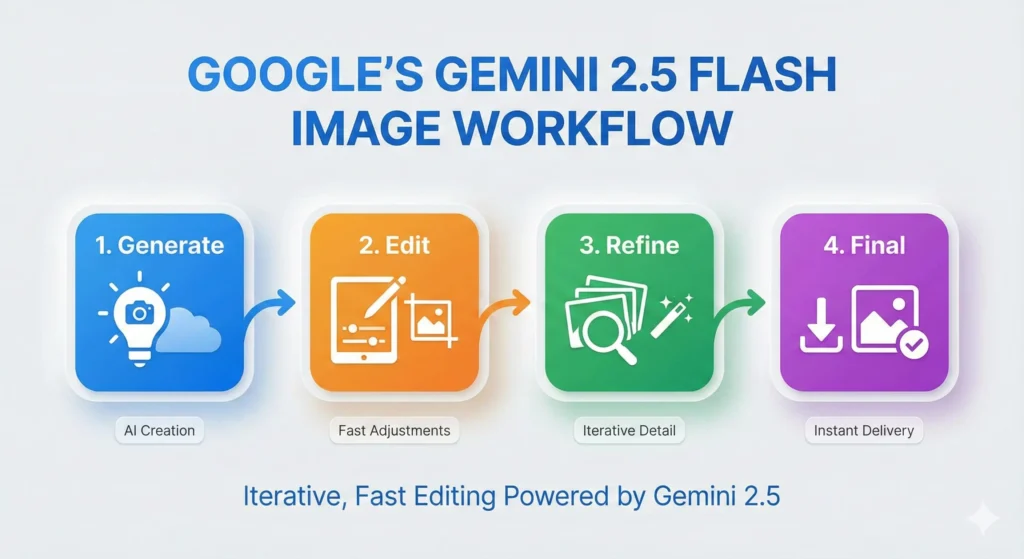
Nowadays, a typical session is represented by the following chain of actions:
- Generate a base image
- Fix mistakes
- Adjust the background
- Modify small details
- Download the final version
This series of edits extends the time of the session and thus, users are kept within the Gemini ecosystem.
Annotation and Marking Tools
Certain new features allow users to draw a circle or mark an area they want to be changed. The AI makes the edits only in that section. It is a simple method and works great for people who are not familiar with professional tools.
People now tweak the same photo again and again instead of snapping one shot then quitting the app – this shift stands out in how folks act each day.
Here is a quick summary of how these features change user behavior:
| Feature | User Impact |
|---|---|
| Conversational editing | Users stay longer and fix mistakes easily |
| Targeted area selection | More control with less skill required |
| Fast rendering | Encourages repeated edits |
| Improved reasoning | Builds trust in the output |
The Swiggy Scenario: When Realism Becomes a Problem
The model’s lifelike responses have caused several problems. One major example happened in India – this situation centered on Swiggy, a food delivery platform.
How the Scam Worked
A single buyer got a box of eggs. Just one had a crack. They snapped a picture then told the AI to add extra damage marks. The altered photo seemed genuine. They sent it in to show evidence. Since the software didn’t catch the tampering, Swiggy issued the money back.
This thing blew up fast. So, it showed what else was hiding behind that door.
New Misuse Patterns
– Individuals are beginning to make stuff
– Fake bills for meals or trips
– Fake food pics used to score refunds
– Pics of supposedly broken items – just to score new ones
Now customers’ helpers doubt photos like never before. So platforms need gadgets that check if pics are real. This adds price, delay, plus hassle into the mix. Also reveals how quickly fake realism breaks old-school trust built on just looking at an image.
Why Creators Are Moving to Gemini
Some creators now use Gemini because it just works better. A lot go for faster results, fewer errors, yet easier fixes, NanoBanana delivers each one. Instead of juggling tools, they pick what fits clean workflow needs.
Better Workspace Integration: Since Gemini’s built right into Gmail, Docs and Slides, it flows naturally with daily tasks. So you can create images, graphs or visuals without leaving your usual apps.
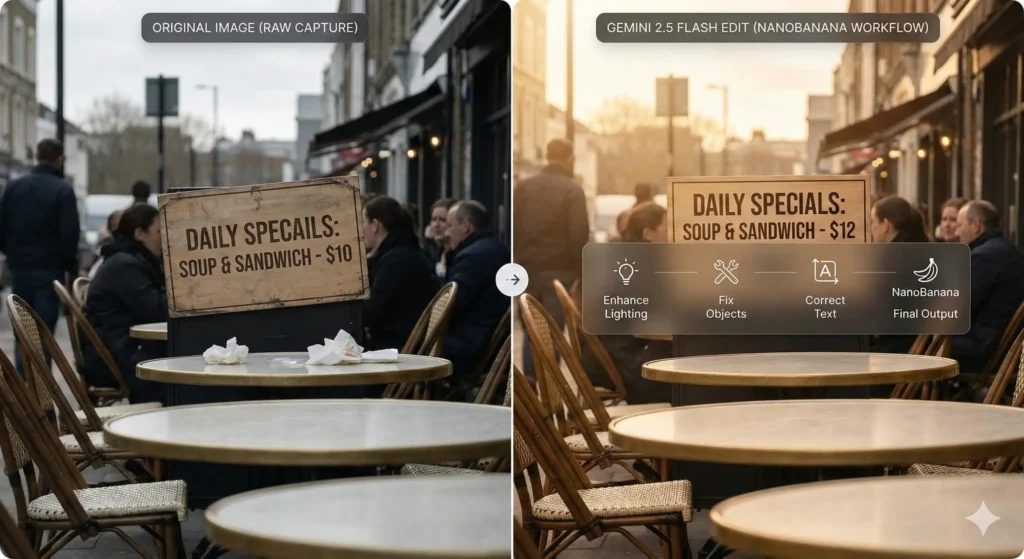
Accurate Text for Visuals: One major benefit? Text that actually matches the image. Artists get tools to create:
– Infographics
– Process diagrams
– Social banners
– Slide visuals
Now they can skip installing more apps just to adjust tags or include clear wording.
Low Cost for Heavy Use: Google’s Gemini 2.5 Flash Image works well. Lots of people make or tweak many pictures daily while saving cash. That’s why folks creating various versions tend to like it.
What This Means for OpenAI
Though OpenAI’s great at crafting imaginative stuff, Gemini takes the lead when it comes to practical use. NanoBanana’s image tool turned AI into a regular part of everyday life instead of just something you try once in a while.
Here’s what OpenAI should think about:
- People want AI that edits better than it creates
- They want the text to be easy to read
- They want the outcomes fast – so they’re rushing through each step without slowing down
- They’re looking to handle every tiny part on their own, whether it’s big or small
If OpenAI doesn’t hit these targets, then Gemini could grow even more in this area. Because if you don’t know this yet, last quarter, Gemini grew way quicker than ChatGPT: fivefold speedier.
