
AI assistants have advanced far beyond just answering questions. They are now able to browse the web, work with applications, and manipulate data with much less manual effort. Muse AI from Meta is one example where an AI assistant may ease the strain on users when it comes to performing daily activities and working on time-consuming projects.
But what is Muse AI, what are its capabilities, and how might it be of use to you? In this article, we’ll explore its features, explain how it works, and show how you can use it.
What is Muse AI?
Muse AI is the AI agent developed by Meta, which has evolved from something that simply replied to calls. This innovation could be another major milestone in computing, much like the story of the 19-year-olds who founded a stealth startup and secured $11 million in funding to develop an AI computer.
Unlike a traditional chatbot that simply replies to call requests, Muse can communicate with websites and other applications. It can also operate quietly and keep up with its work.
Muse was introduced in September 2026 by Meta. It works through its applications and WhatsApp and is compatible with desktops and other devices. It works well depending on other applications or services and functions of the device.
How does the Meta Muse AI agent work?
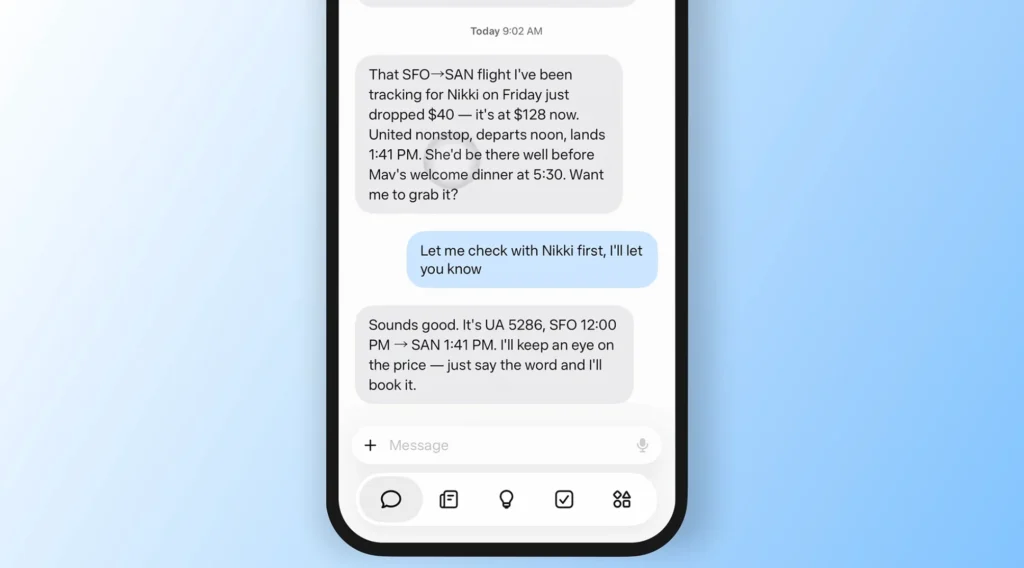
The Meta Muse AI agent is an AI model that can work online and has a dedicated computing environment.
Here is how the process works:
- You give it a task: Describe what you want to accomplish in a conversation.
- Plan creation: Muse creates a plan describing steps and tools needed to complete the task.
- Muse gets action: Muse can browse the Web, use linked apps, gather information, and complete supported actions.
- You are in control: You can view its activity, give permissions, or approve action before it is taken.
To understand how Muse differs from AI tools that mainly generate content, explore our guide to agentic AI vs. generative AI, which explains how these two approaches work and where they differ.
Meta runs Muse using Muse Secure VM, a special virtual machine with its own browser. This environment is built to separate the activities of Muse from the activities of the user.
Muse is capable of learning from conversations and data that you allow it to access, and this allows it to give you personalized recommendations in the future. However, Muse may still make errors, misunderstand messages, or be unable to access certain websites.
What is Meta Muse Spark AI?
Meta introduced Muse Spark as the first model in its Muse family, designed for multimodal reasoning and tool use. You can read Meta’s official announcement of Muse Spark for more details about its development and capabilities. The company launched Muse Spark earlier in April 2026 and later announced Muse Spark 1.3 in September.
The difference is significant: while Muse is the personal agent, Muse Spark is surely the model that provides reasoning or task execution.
A model can follow a direction and produce an output, but an agent utilizes this intelligence together with other capabilities like tools, permissions, and an IT environment in order to perform a multistep activity. Muse uses the above-mentioned factors to allow users to assign tasks, meaning they will not have to do everything themselves.
You may learn more about the model following the announcement of the Muse Spark by Meta.
What are the main Muse AI features?

Muse AI does more than chat, it helps people and communicates with apps.
- Task automation: The AI is able to automate some tasks related to support, such as filling in forms and booking something.
- Web browsing: This process navigates the web to obtain information.
- Apps connected to the app: The app is connected to the apps necessary to accomplish your goal.
- Goal tracking: It breaks down goals into small steps for moving toward your goal.
- Background work: Tasks are completed in the background even if you’re not using the app.
- Personalized assistance: The AI provides personalized assistance based on the information available to it.
- Content creation: It can help you create documents, proposals, and other content.
- Image generation: An image generation feature is available in the tool.
- Action approvals: This is when you ask to perform a certain action.
- Activity history: Users may look through what the AI did and perhaps find it useful to track its activity.
Availability depends on the feature, connected service, and account. For more information, users should refer to Meta’s official Muse overview.
10 practical Muse AI use cases

- Research: Research websites, compare sources, and summarize findings.
- Calendars & Emails: Organize schedules, draft emails, and coordinate meetings.
- Travel Planning: Research destinations, create an itinerary, and assist with booking.
- Shopping: Compare products, find alternatives, and order them from approved vendors.
- Personal Planning: Track effectiveness, meetings, and all daily tasks.
- Content & Marketing: Create blog posts, social media posts, posts, and designs.
- Customer Acquisition: Identify audiences, write proposals, and implement all marketing activities.
- Business Management: Create records and help with all bookkeeping activities using proper tools.
- App Management: Coordinate the work of different service providers like Canva, Dropbox, Notion, or Asana.
- Multi-step Job: Break down large goals into steps, monitor success, and do all tasks in the background.
Features depend on integrations, permissions, and website access.
Which apps and services integrate with Muse AI?

Meta has been expanding Muse’s connections to third-party tools, particularly for business workflows.
Recent integrations and connectors announced for Muse include:
| App or service | Potential use |
|---|---|
| Canva | Design and marketing materials |
| Dropbox and Box | File access and organization |
| Figma | Design-related workflows |
| QuickBooks | Business and accounting tasks |
| GitHub | Software development workflows |
| Zoom | Meeting-related tasks |
| Asana | Project and task management |
| Klaviyo | Marketing and customer communications |
| Notion and Granola | Notes and knowledge management |
| Shopify and Stripe | E-commerce and payment-related workflows |
| Slack | Team communication |
| Facebook and Instagram business accounts | Social and business management |
The function and availability of each connector can differ. That being connected to an app doesn’t imply that Muse is capable of performing all operations within it.
The Muse for Small Business announcement by Meta in September 2026 outlines the plans for connecting business tools and facilitating the users to meet goals like acquiring clients and managing their work processes.
Muse AI vs. ChatGPT: What is the difference?
Both tools can answer questions, generate content, and help with research. The main difference is their approach to completing work.
| Feature | Muse AI | ChatGPT |
|---|---|---|
| Main focus | Personal AI agent that takes action | General-purpose AI assistant with a range of tools |
| Task execution | Designed for multi-step work across websites and connected apps | Capabilities depend on available tools and features |
| App connections | Supports a growing set of connectors | Supports integrations and tools depending on the plan and environment |
| Background work | Designed to continue eligible tasks in the background | Depends on the specific feature being used |
| Best suited for | Delegating supported personal and business tasks | Research, writing, reasoning, learning, and supported workflows |
Neither tool is automatically better for every user. Muse may appeal to people who want to delegate actions across connected services, while ChatGPT can be useful for a broad range of conversational, creative, analytical, and tool-assisted tasks. Compare the features available to you rather than relying on the product names alone.
What is new with Muse AI in 2026?

The growing focus on advanced AI is also influencing how governments discuss and regulate the technology. Read more about Trump’s order on renaming AI as “super intelligence” and what it signals for the evolving AI landscape.
September launch: Meta introduced Muse as a personal AI agent powered by its Muse Spark model, designed to plan tasks and take action across connected services.
Small-business tools: Meta added integrations with services including Shopify, QuickBooks, Canva, Slack, and Dropbox to help businesses manage operations and find customers.
iPad support: In October, Muse gained a dedicated iPad app and additional connectors, including Notion and Granola.
Expanded ecosystem: Meta announced retail partnerships and plans to bring Muse to more experiences, including its AI glasses.
Shopping restrictions: Amazon blocked Muse from accessing its retail site, highlighting how website restrictions can prevent AI agents from completing purchases.
Privacy debate: Reports raised concerns about AI agents accessing private information on computers. Meta says Muse operates within permission-based safeguards, but users should review access carefully. Read the privacy report.
Is Muse AI free?
According to the details given on the Muse site by Meta, the features are offered free of charge and for limited usage. The limit can either be bought for a certain amount or appealed for fresh limits.
Prices and usage limits by Meta may change during the development of the product. Therefore, it is recommended to check the Muse official website in order to get the latest information regarding the available opportunities. It is not safe to assume that any offered feature or integration is included in the free usage allowance provided by Meta.
How can you access Muse AI?
The Muse application can be accessed using its application and, where allowed, desktop devices and WhatsApp. The functionality will vary according to Meta’s plans for rolling out the service to several geographical locations.
Here are the basic steps to follow:
- Go to the official Muse website
- Check to see if it is possible to access Muse in your region and on your device
- Either log in or follow the instructions provided by Meta
- Start with a small task first before applying it to sensitive accounts
- Check the permissions as well as the approval settings before allowing Muse to do anything.
In case the Muse application is not available in your region, you will need to wait for the company to provide access to it in that region. Do not share your account information or login details anywhere.
Is Muse AI safe? Privacy concerns and limitations

Based on information from Meta, Muse is equipped with the capabilities to help users keep their data safe. The features of Muse include a virtual machine, a secure vault for credentials, getting pre-approval for actions, and being able to view the history of activities. Meta states that conversations via Muse will not be relayed to advertisers.
The information that the company provided here is inconclusive. Once you grant the program access to the profiles, the application may misinterpret your request and take actions you did not intend.
When we address restrictions of the applications, we need to keep in mind the following:
- Sensitive data: Limit the number of accounts that you are supplying to the application.
- Authorization settings: Review requests before allowing AI to send messages or manage payments.
- Mistakes: Verify important information, finances, and data created by the application.
- Web restrictions: Some IDs may restrict the use of automated services.
- Add-ons: The number of available services may differ.
- Geography: Not all features might be available everywhere.
- Trust and privacy: Research the privacy policy of Meta before linking your profiles.
Meta has released information about the safety of its service, but it’s worth relying on your own understanding of the potential risks connected with this service.
Is Muse AI worth trying?

Muse AI is worth exploring if you want an assistant that can do more than generate text. Its combination of web browsing, connected apps, task planning, and background execution could reduce the manual work involved in everyday and business tasks.
Its usefulness still depends on reliable execution, supported integrations, and the level of access you are comfortable granting. Website restrictions and privacy concerns also limit what it can do, so users should not rely on it to replace human judgment entirely.
Start with low-risk tasks, check its work, and expand its permissions only when you understand how it behaves. That is the most practical way to evaluate whether Muse AI fits your routine.
FAQs
It depends on the task. Muse focuses on completing actions across websites and connected apps, while ChatGPT offers broad capabilities for writing, research, reasoning, and tool-assisted work. Compare their available features and integrations before choosing.
Amazon has restricted Muse’s access to its shopping platform, citing concerns related to third-party agent access and security. This highlights a major limitation of AI agents: they cannot reliably complete online tasks when websites block automated access.
You can access Muse through its official website or supported mobile apps, depending on your region. Visit Muse’s official website to check availability and follow the setup instructions.
No, Muse cannot guarantee $10,000 in earnings. It can help research business opportunities, identify potential customers, and automate supported tasks, but your results depend on your strategy, execution, and market conditions.
Muse has attracted privacy criticism over reports that it can build detailed profiles of people connected to its users. Critics have questioned how the agent handles personal information, while Meta points to its privacy controls and permission settings.
It depends on what you need. Muse focuses on completing tasks across websites and connected apps, while Gemini and Claude offer their own AI assistant and agent capabilities. Compare their integrations, task automation, privacy controls, and pricing before choosing.
Yes. Muse can continue eligible tasks in the background after you close the app. It may notify you when a task finishes, circumstances change, or it needs your approval.
Meta provides controls for managing information and connected services. You can ask Muse to forget specific details and review its memory and permission settings to manage what information it can retain or access.
