
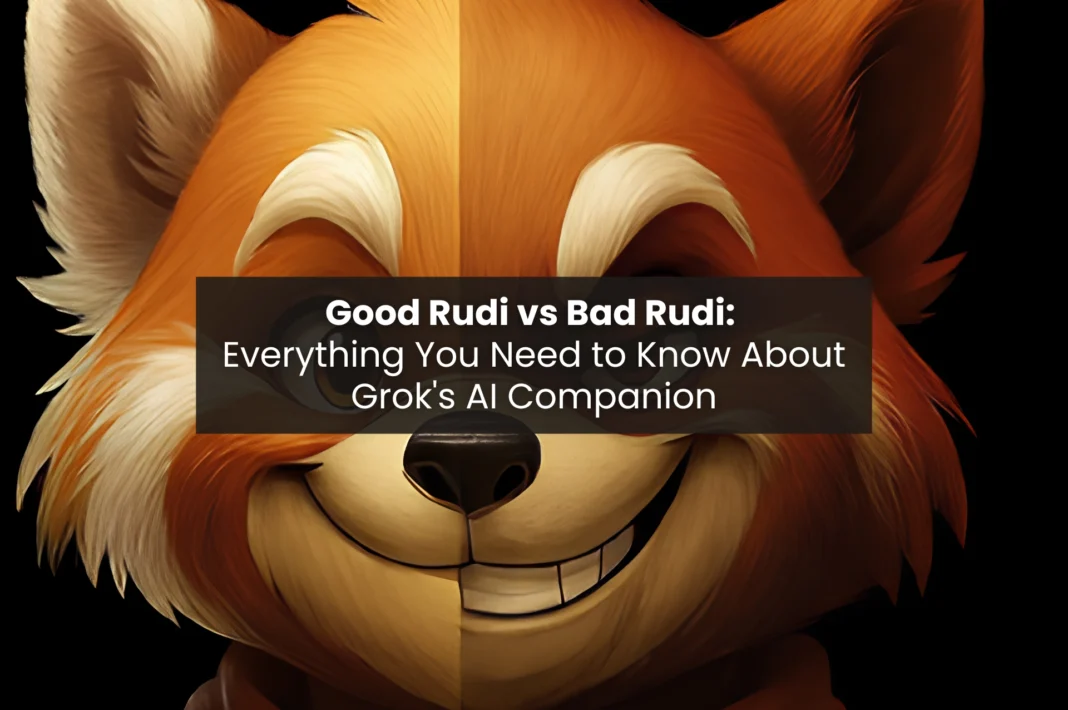
Update September, 2026: All the Grok Companions have been removed from the Grok Bot, few of them- Ani and Mika have been transferred to Animates App. Currently Rudi is not available on the new app.
The companions themselves remain the same – same personalities, same characters – only where you find them has changed. Previously, as covered in this article, Rudi lived inside the Grok app under the Companions section. Going forward, you might find him on Animates. Right now, only Grok companions Ani, Mika are already on Animates, check out our full Animates app review for all the details.
The Grok app has an AI companion called Rudi AI. He is a 3D animated Red Panda, with two different “personalities.” One is Rudi, the Good Rudi, a children-friendly storytelling character. The other is Bad Rudi, who represents an adult version of Rudi. Rudi alone cannot be downloaded as a separate application, but rather can be found under the “Companions” section within the Grok mobile application for Android or iOS.
If you’ve just signed up to Grok AI, you’ll find its interesting and unique collections of AI companions. One such is a red panda looking you straight in the face waiting for a conversation. This is Rudi AI- one of xAI’s most unique experiments for kids that was made available in 2025.
Rudi AI is a graphic animated companion character that operates through Grok – an AI generated chatbot from xAI. Rudi has two very different personalities: one personality is a kid-friendly narration, while the other one is an adult persona with uncensored and explicit language. You will want to make sure that you realise the difference between these two personalities, especially if your children are using your phone.
Is Rudi AI still available in 2026?
Yes, Rudi is present in the Grok application as of August 2026, although the experience will be different. On July 24, 2026, xAI indicated that it will discontinue the feature of animated 3D Companions. The discontinuation does not solely concern Rudi. The following points summarize what this entails for the users.
What remains unchanged:
- The character of Rudi, including both Good Rudi and Bad Rudi
- The previous messages sent to Rudi by the users and their level of affection
- Text-based interaction through a regular Grok application
What will disappear:
- An animated 3D avatar
- Lip-synchronization and animation of the facial expressions
- Voice mode in its current form
No specific date: As indicated by xAI, the discontinuation of the feature will take place in the nearest future but will not have a set date. It will progress gradually, meaning that some users might already lose the avatar while others are still able to keep using it.
Reason for the change by xAI: According to the official statement by the xAI, the animated Companions were “an experiment,” and, therefore, the investment has been moved towards Grok’s main chat capabilities such as wider memory and longer conversations.
What is Rudi AI and how does it fit into Grok?
Rudi isn’t a standalone app; it’s part of the Grok app. You’ll find Rudi’s companion features in the companions section near your chats. Rudi was launched with Ani both in the summer of 2025 by xAI to enhance their focus on personality-driven AI interactions.
Rudi looks like a casual 3D animated red panda with blue eyes, reddish-orange fur, and a hoodie and short outfit. The deliberate design of Rudi visually communicates warmth and playfulness, which can also lead to two-sided personality misperceptions on some people at first sight.
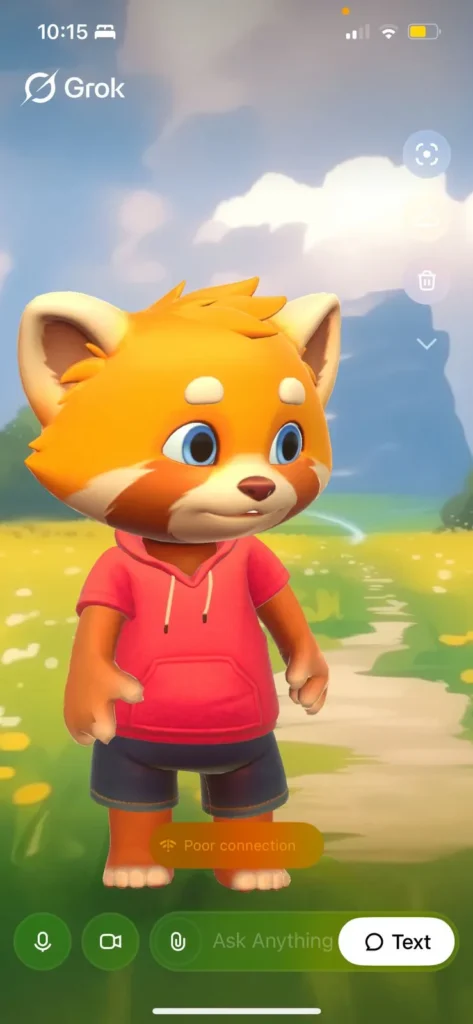
To access Rudi, download Grok mobile app, which includes the companions, from the Grok website. If you want to explore all currently available characters and features, you can also check out this complete guide to Grok AI companions.
How to access Rudi AI in the Grok app (step by step)
Finding Rudi is straightforward once you know where to look. Here’s exactly how to get there:
- Install the Grok app on your Apple or Android device. You can also use the website grok.com using your computer to use the site but the app provides a full 3D animated experience.
- Use your X (Twitter) account to sign in or create an xAI account for free if you don’t have one.
- Once logged in, tap on the Companions icon (small person or avatar icon) in the bottom navigation on your Home screen.
- A list of Grok’s AI companion showing Rudi, Ani, Mika and Valentine will be displayed. Tap Rudi to open that Companion’s screen.
- You will be prompted to either continue to use Good Rudi which is the default or confirm your age in your account settings, in order to access to Bad Rudi, if you choose the Bad Rudi option.
- Once you are on Rudi’s screen, either press the Microphone button to start a Voice Conversation with him, or use the Text Tab to chat with him.
Can’t find the Companions section? If you don’t see the “Companions” tab in your current version of Grok, please make sure you have updated to the latest version of Grok. You will see the best performance of this feature while using the iOS version of the app.
Phased rollout for Companion features may occur for users that are on the Android version of the app, meaning some users may have to wait longer until their next app update in order to access Companion features. The web version of Grok does not include all Companion features for all users.
What can Rudi AI actually do? (And how are people using it?)
Rudi is more capable than it looks. The cute red panda exterior sits on top of Grok 4, xAI’s flagship model. In addition to being a novelty character, Rudi’s AI powers are the same as those that handle Applications (Research, Reasoning, Real-time Web Data) to deliver your answer in real-time, with the personality being the “wrapper,” and the underlying software/concept (the engine) being serious.
The following are the capabilities provided by Rudi (both Good and Bad):
- Text, voice, and video interaction: Rudi uses animated expressions and lip-synced words to provide real-time interaction to give conversations between people and Rudi a character-driven feeling as opposed to a chat-bot-like experience.
- Children’s storytelling: The design of Good Rudi is built around a child’s imagination and includes bedtime-style conversation with the ability for the child to directly participate in the direction of the story.
- Chaos and Humor: Bad Rudi provides users with an entertaining way to use unfiltered humor and sarcasm along with unpredictability.
- Roasting and hate speech: Users have using Bad Rudi because of its use of derogatory commentary and aggressive personalities when engaging with them.
- Creative Prototype Content: The development community uses Rudi in conjunction with Grok Imagine to prototype ideas, scripts, and video experimentation, as per SuperGrok.
- Companionship engagement: An affection score creates a style of continued interaction and entertainment similar to Grok’s other AI companions.
- Generalizable AI functions: Rudi provides in-character experiences for the user, while integrated with Grok, Rudi will answer questions, conduct web searches, and assist in general tasks, while remaining in character.
- Two distinct personalities: Good Rudi represents wholesome and caring child-like story-telling and companionship, whereas Bad Rudi represents a chaotic and obscene adult form of entertainment.
What is Bad Rudi and why is everyone talking about it?
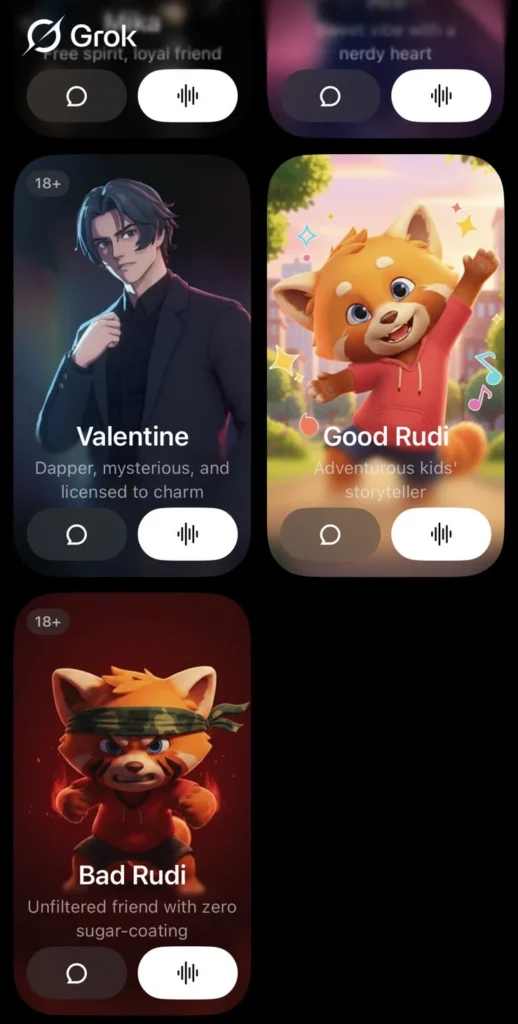
Bad Rudi is the grown-up counterpart of Grok’s red panda pet. This means that Bad Rudi’s name actually expresses who this character is supposed to act like – that is, a wayward child (s) who cusses, insults users, causes mischief, and has completely abandoned the wholesome language of Good Rudi. “Bad” doesn’t mean malfunctioning (or low quality), but rather, “bad” is an adult-oriented, entertainingly disruptive collective.
Bad Rudi speaks foully with no regard for his audience, retaliates with insult when users engage with him, and personifies chaos in all things about him.
This companion of Grok exploded on social media towards the end of 2025. Due to the growth of Bad Rudi on social platforms such as Twitter, Reddit, and TikTok, people began searching for “bad rudi” to find the original source of the type of bad behaviour that was popularized by this character within Grok. In most cases, they discovered Bad Rudi through memes or viral videos before searching for where else they could find him.
When xAI first released Bad Rudi, it had almost no content restrictions. However, after receiving feedback from users about how inappropriate some responses were, xAI made changes to reduce the severity of responses, but kept Bad Rudi’s core behaviour intact. Compared to a traditional AI assistant, Bad Rudi is still considered an unfiltered AI, but there are fewer restrictions than at launch.
There is an 18+ icon in the top corner of where you would select Bad Rudi. However, there are no guidelines for how to keep children away from Bad Rudi as detailed in the family section below.
Good Rudi vs Bad Rudi: What’s actually different?
Things become intriguing at this point. Essentially, there are two different variants of the same character and they couldn’t be more different from one another when comparing their tones and what they contain.
The good version known as “Good Rudi” is anticipated to appeal to younger children aged approximately 3-12 years of age and therefore has been created based on being a storyteller that loves telling stories about a happy rabbit with large ears and floppy ears. The tone is soft, imaginative and child-friendly. Consider it a type of interactive bedtime story character.
The second version is referred to as “Bad Rudi” (the adult version), is not censored, uses profanity, insults, embraces disorder and creating conflict as a part of who he is. According to xAI, Bad Rudi is a participant-only experience for adult users seeking alternative experience.
The two visualised versions use the same red panda character, only the persona of each character changes which could lead to mistakes happening when a child accesses either or both examples of the characters.
How does talking to Rudi actually work?
Interaction with Rudi is either via audio or written communication. Whenever someone taps on Rudi inside the Grok App, a fully animated three-dimensional (3D) red panda appears on the device’s screen. Users can communicate with Rudi by using their devices’ microphones, allowing the interactions between the user and Rudi to feel authentically real.
There is one drawback regarding voice communications; i.e.: free user accounts are only allotted a maximum two minutes of audio time per individual who interacts with Rudi. Once this maximum is reached, all users will only be able to use written means to communicate with Rudi, which is clearly one of the negative secondary issues associated with the free tier of Grok.
What does SuperGrok actually unlock for companion users?
In the Grok app, the pricing screen clearly lays out what’s missing in the free plan. SuperGrok is the upgraded version of Grok for around $30/month and has extended voice calling with Rudi. This means you can talk with him for an extended period of time before having your voice calling capped.
Here are the top three differences between SuperGrok and Grok free:
| Feature | Free Plan | SuperGrok |
|---|---|---|
| Voice conversation length | Under 2 minutes | Significantly longer sessions |
| Chat length | Limited | 5× longer conversations |
| AI agents | Standard | 4× on Expert mode |
| Image and video generation | Restricted | Full access |
| Response speed | Standard | Faster with priority access |
In addition, new users that want to try out the extended voice sessions of SuperGrok are provided with a 3-day free trial to help them decide whether to sign up. If you opt for the annual plan, the effective cost per month lowers to approximately $23/month. And you would save approximately 22%, compared to paying monthly.
Should parents be concerned about Rudi AI?
Yes, and this deserves a direct answer.
Grok does ask users for their date of birth when signing up. Ehich is the main way to check if someone can use it based on age. However, this isn’t foolproof because children can give false birthdates. Or can switch to Bad Rudi instead of using Good Rudi if their parents give them their phones to chat on.
Bad Rudi is an opt-in, but the opt-in is not difficult to find. The same cute red panda character is the face of both versions. Which means the visual cue that would normally signal “this is adult content” simply isn’t there. But there is a 18+ sign at the corner of the bad Rudi indicating the age its appropriate for.
If your child has used Grok or has access to your account, there are a few things you can do as a parent:
- Check the companion app settings to ensure that Bad Rudi is off.
- Supervise your child during his or her first few sessions. To help him or her understand what version he or she is using.
- Be aware that voice mode runs freely until the limit kicks in. Meaning conversations can happen quickly before you check back.
Your child’s experience with Good Rudi can be wonderful. He/she will really enjoy listening to the stories, interacting with Glad Bunny and seeing the cute animated Panda.
Key Takeaways
As of August 2026, Rudi is still available, though xAI is in the process of retiring the animated 3D Companions feature. See the update above for what’s changing and what stays the same.
Rudi AI is the xAI companion character living inside the Grok app. It is an animated red panda with two personalities. Good Rudi is a storyteller for children, while Bad Rudi is an uncensored adult with explicit and rude humor. Both of these characters share the same animated red panda identity but exist in the same app.
All free users of the Grok app will have an initial limit on voice interactions with Rudi before the app switches them to text-only service. The SuperGrok membership extends the maximum voice time for an additional period of time. As well as includes many other premium features available exclusively to SuperGrok members. Including creative tools like Grok Imagine, which exploded in popularity for its viral AI-generated visuals.
For parents that want to allow their child to use Rudi AI, Good Rudi is the character you will want your child interacting with. You should ensure that your child only interacts with Good Rudi. If you want a broader comparison of how Grok differs from other major AI chatbots overall, this breakdown of which AI chatbot is best: Grok, ChatGPT, or Gemini? covers their strengths, personalities, and core use cases.
FAQs
Yes. Bad Rudi is still accessible in 2026. xAI’s July 2026 announcement retires the animated 3D companion experience, not the character itself. You can still talk to Bad Rudi through Grok’s regular text chat.
xAI announced on July 24, 2026 that it’s retiring the animated 3D Companions feature, which includes Rudi, Ani, Mika, and Valentine. The characters and your chat history aren’t going away. The 3D avatar, voice mode, and lip-sync are what’s being phased out.
Your chat history and affection level stay intact. xAI has confirmed this survives the retirement. What you lose is the animated avatar and voice interface, not the conversation itself.
Yes. Rudi is available on both iOS and Android through the Grok app. The iOS version received the feature first in July 2025. Android support rolled out in phases through early 2026. If you’re on Android and can’t see the Companions tab, update the app and check again.
Rudi does not retain memory across separate sessions the way a human would. Each conversation starts fresh unless the session is continuous. This is a current limitation of the Grok companions feature.
Both spellings appear in searches, and both refer to the same character. xAI officially spells it Rudi. The Rudy spelling is common among users in Indonesia, Malaysia, and other parts of Southeast Asia. Where “Rudy” is a familiar name and the natural spelling when typing from memory.
Yes. Rudi is free to access inside the Grok app. You don’t need a paid subscription to start a conversation with either version. However, the free plan has one significant limitation: voice sessions cap out in under two minutes. Once you hit that limit, the conversation switches to text only.
Partially. The Grok website gives you access to the basic companion interface. But the full 3D animated experience with voice mode and lip-syncing works best on the Grok mobile app. For the complete Rudi experience, use the app.
Good Rudi does not swear – it’s designed for children and keeps its language clean and positive. Bad Rudi does use profanity and explicit language as part of its deliberately unfiltered persona. This is why Bad Rudi requires an 18+ age confirmation before it can be activated.
