
Why are your Claude AI conversations not reaching their full potential
There are many people who rely on Claude AI for anything related to writing, research, brainstorming, programming, or any task in their daily life. However, the replies from Claude are often unoriginal or incomplete.
The issues may not originate with Claude itself. In most cases, users provide Claude with too little information to be able to respond appropriately.
Poor prompts lead to wasted time and multiple amendments and prevent users from receiving any value from Claude AI.
A good-quality prompt can allow Claude to work as a writing assistant, a research partner, a programming helper, a strategist, or a coach to boost productivity.
This guide offers a collection of 100 Claude prompts for the most common tasks and activities. Users wanting to find ready-made templates can also check Aadhunik AI’s library of AI prompts.
But before going to the list, it is worth learning why Claude reacts differently to diverse prompts.
What makes Claude AI prompts different from regular AI prompts?
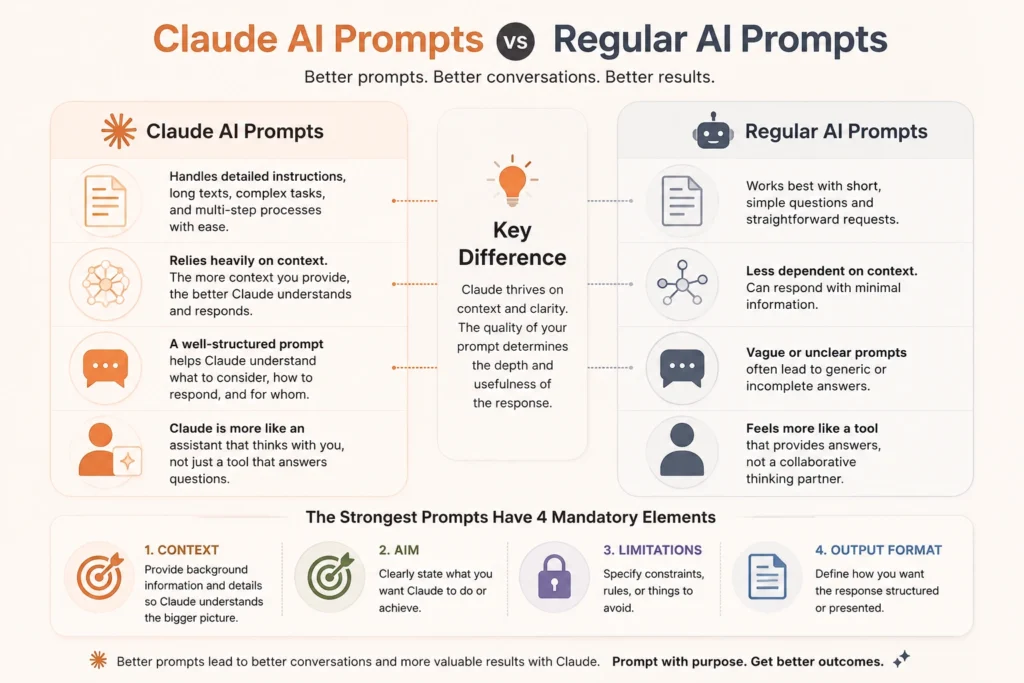
The fact that Claude is able to deal with detailed instructions, lengthy texts, complicated assignments, and processes that consist of multiple stages makes anything context-related crucial when constructing prompts.
A one-word question may receive an equally one-word answer. A properly structured prompt assists Claude in understanding what needs to be considered, how to react, and for whom the response is intended.
Hence, Claude is to be seen more as an assistant than just an entity that answers questions.
The strongest prompts feature four mandatory elements: context, aim, limitations, and output format.
Moreover, Claude AI is not the only option for content creation, and understanding how different AI models perform can help users choose the right tool. Read this comparison of Claude vs ChatGPT vs Grok for content writing to understand their strengths and differences.
How to write Claude AI prompts that consistently deliver better answers
- Establish the desired outcome: Indicate to the software program what results you expect.
- Provide relevant contextual information: Tell to Claude what your goal is, who your audience is, and what your needs are.
- Indicate specific roles to follow: Ask the AI assistant to act as an expert of your choice.
- Specify the limitations: Mention the format, tone, style, and length you expect.
Furthermore, the Claude model you choose can influence how it handles complex instructions, reasoning, and detailed tasks. Before creating advanced prompts, explore this Claude AI models comparison guide to understand which model fits your workflow best.
100 best Claude AI prompts for everyday tasks
Claude AI prompts for writing and content creation
1. Blog post: First, analyze the topic and target audience. Then, write a 1,500-word article about [topic] with clear headings, examples, and a logical structure.
2. Content outline: Create a detailed outline for [topic]. First include the main sections, then add supporting points, examples, and key information for each section.
3. Introduction writing: Write an engaging introduction for [topic]. Start with the reader’s problem, explain why it matters, and finally introduce the solution.
4. Conclusion writing: Write a conclusion for this article. First summarize the key points, then reinforce the main takeaway, and finally add a strong closing statement.
5. Headline generation: Generate 20 headlines for [topic]. Make them attention-grabbing while ensuring they remain accurate, relevant, and aligned with search intent.
6. Content rewriting: Rewrite this content to make it clearer, shorter, and more engaging while keeping the original meaning: [text].
7. Professional editing: Edit this content for grammar, tone, and readability. Additionally, remove repetition and improve the overall flow without changing the message: [text].
8. Simplifying content: Rewrite this explanation for beginners. First identify complex concepts, then explain them using simple language and relevant examples: [text].
9. SEO optimization: Optimize this content for [keyword]. First analyze search intent, then improve headings, keyword placement, structure, and readability.
10. Content ideas: Generate 30 content ideas for [topic] with audience, search intent, and value.
11. Social media posts: Turn this article into engaging social posts with hooks and CTAs: [article].
12. Email writing: Write a professional email about [topic] with a clear purpose and CTA.
13. Brand voice development: Create a brand voice guide with tone, style, vocabulary, and examples: [content].
14. Storytelling improvement: Turn these points into an engaging story with a clear flow and smooth transitions: [details].
Claude AI prompts for research and information analysis
15. Content review: Review this content and share feedback. First highlight the strengths, then point out weaknesses, and finally suggest improvements: [content].
16. Research summary: Summarize this research and highlight the five most important findings: [research].
17. Document analysis: Analyze this document and explain its main points, evidence, and conclusions: [document].
18. Compare sources: Compare these sources and explain their similarities, differences, and key perspectives: [sources].
19. Key insights: Extract the most valuable insights from this information and explain why they matter: [content].
20. Research questions: Generate 15 useful research questions to explore [topic] in greater depth.
21. Trend analysis: Analyze these trends and explain how they may impact [industry] over time: [data].
22. Report creation: Turn these research notes into a structured report with key findings and recommendations: [notes].
23. Fact-checking: Review these claims and identify which points require additional verification: [claims].
24. Pros and cons analysis: Analyze the benefits, risks, advantages, and disadvantages of [topic].
25. Decision analysis: Compare these options based on cost, value, risks, and long-term impact: [options].
26. Competitor analysis: Compare these competitors based on features, pricing, audience, strengths, and weaknesses: [competitors].
27. Research plan: Create a step-by-step research plan for [topic], including key questions and sources to explore.
Claude AI prompts for productivity and daily workflows
28. Daily planner: First, review these tasks and deadlines. Then, create a realistic daily schedule based on priorities and available time: [tasks].
29. Weekly planner: Create a weekly plan that balances urgent tasks, important projects, and available working hours while maintaining productivity.
30. Meeting summary: First, analyze these meeting notes. Then, summarize key decisions, action items, owners, and deadlines: [notes].
31. Task prioritization: Review these tasks and rank them by urgency and importance. Also, explain which tasks I should complete first and why: [tasks].
32. Project plan: Create a step-by-step project plan for completing [project]. Include key milestones, deadlines, and required actions.
33. Workflow design: Analyze this task and create a repeatable workflow that improves efficiency while maintaining quality: [task].
34. Time management: Review my current schedule and identify productivity issues. Then, suggest practical ways to improve time management: [schedule].
35. Brainstorming: Generate 25 practical solutions for this problem. Include creative approaches and explain why each idea could work: [problem].
36. Decision support: Compare these options based on benefits, risks, costs, and outcomes. Finally, recommend the best choice with reasoning: [options].
37. Checklist creation: Create a detailed checklist for completing [task]. Include important steps, possible challenges, and final review points.
38. Meeting agenda: Create a structured meeting agenda for [topic]. First include discussion points, then add goals, questions, and expected outcomes.
39. Goal planning: Break this long-term goal into monthly, weekly, and daily action steps. Also, include milestones to track progress: [goal].
Additionally, AI prompts can help streamline career-related tasks, from improving resumes to preparing for interviews. Users can explore more practical examples in this guide on how to use AI for your job search with prompts for every step.
Claude AI prompts for coding and software development
40. Debug code: First, analyze this code. Then, identify errors, explain each issue, and provide a corrected version: [code].
41. Code explanation: Explain this code step by step for a beginner developer. Also, describe what each section does and why it is needed: [code].
42. Code review: Review this code for readability, performance, security, and maintainability. Then, suggest practical improvements: [code].
43. Documentation: Create technical documentation for this code. Include setup steps, usage instructions, and important details: [code].
44. Software architecture: Suggest a scalable architecture for building [application]. Explain the structure, components, and reasons behind your recommendations.
45. Feature planning: Break this software feature into development tasks, technical requirements, and testing steps: [feature].
46. Test cases: Generate detailed test cases for this function. Include normal scenarios, edge cases, and expected results: [code].
47. Error analysis: Analyze this error and explain its possible causes. Then, provide practical solutions to fix it: [error].
48. Code refactoring: Improve this code by making it cleaner and easier to maintain while keeping the same functionality: [code].
49. Performance optimization: Review this code and identify ways to improve speed, efficiency, and resource usage: [code].
50. Security review: Analyze this code for security risks. Also, recommend fixes to make it safer and more reliable: [code].
51. Learning plan: Create a 30-day learning roadmap for mastering [programming language or technology]. Include daily goals, practice tasks, and resources.
Claude AI prompts for marketing and business growth
52. Marketing strategy: First, analyze the product and target audience. Then, create a marketing strategy with channels, messaging, and growth opportunities: [product].
53. Customer persona: Create a detailed customer persona. Include goals, challenges, needs, preferences, and buying behavior for [audience].
54. Ad copy: Generate 10 advertising variations for [product]. Make each version unique, engaging, and focused on the target audience.
55. Product description: Write a persuasive product description. Highlight customer benefits, key features, and reasons to choose this product: [product].
56. Sales email: Write a sales email for [product]. Start with a strong opening, explain the value, and end with a clear call to action.
57. Competitor analysis: Analyze these competitors and identify their strengths, weaknesses, and missed opportunities: [competitors].
58. Campaign ideas: Generate 20 creative marketing campaign ideas for [brand/product]. Include the concept, target audience, and expected impact.
59. Landing page copy: Create a conversion-focused landing page structure for [product]. Include headlines, benefits, objections, and CTAs.
60. Customer objections: Identify common customer objections about [product]. Then, create effective responses to address each concern.
61. Value proposition: Create five unique value propositions for [product/service]. Explain how each one solves customer problems.
62. SEO strategy: Create an SEO content strategy for [business]. Include keyword ideas, content topics, and ways to reach the target audience.
63. Social media plan: Create a 30-day social media content calendar for [brand]. Include post ideas, formats, captions, and engagement goals.
Claude AI prompts for learning and education
64. Personal tutor: Act as a personal tutor for [topic]. First, explain the basics, then gradually move to advanced concepts with examples and practice exercises.
65. Simple explanation: Explain [concept] in simple terms. Use beginner-friendly examples and, additionally, compare it with real-world situations for better understanding.
66. Study plan: Create a detailed study plan for learning [subject] within [timeframe]. First, divide the topics, then add daily goals, practice tasks, and progress checkpoints.
67. Quiz creation: Create a quiz about [topic]. Include questions first, then provide answers and explanations to help improve understanding.
68. Flashcards: Convert these notes into study flashcards. First, identify key concepts, then create clear questions and answers for revision: [notes].
69. Exam preparation: Create a revision strategy based on my syllabus and exam date. Include important topics, study methods, and a final review plan: [details].
70. Practice exercises: Create exercises to improve my skills in [topic]. Start with beginner tasks, then gradually increase the difficulty level.
71. Answer feedback: Review my answer and provide feedback. First identify what is correct, then explain mistakes, and finally suggest improvements: [answer].
72. Language learning: Create a daily language learning routine for [language]. Include vocabulary, grammar, speaking practice, and revision activities.
73. Interactive learning: Teach me [topic] interactively. Ask one question at a time, evaluate my answers, and adjust the difficulty based on my progress.
Advanced Claude AI prompts to unlock deeper results
74. Expert role: Act as an expert in [field]. First, analyze the problem, then provide professional advice, practical recommendations, and possible solutions: [problem].
75. Step-by-step workflow: Break this complex task into smaller steps. Then, guide me through each stage while explaining the purpose and expected outcome of every step: [task].
76. Critical review: Analyze this idea carefully. First identify weaknesses and risks, then suggest improvements and ways to make it stronger: [idea].
77. Alternative solutions: Provide five different solutions for this problem. Compare their advantages, disadvantages, and possible outcomes before recommending the best option.
78. Improve response: Review your previous answer. Identify areas that need improvement, then rewrite it to make it clearer, more accurate, and more useful.
79. Audience adaptation: Rewrite this content for different audiences. First create a beginner-friendly version, then adapt it for experts and business professionals: [content].
Claude AI prompts for decision-making and problem-solving
80. Scenario planning: Analyze this strategy under optimistic, realistic, and pessimistic scenarios. Explain possible outcomes, risks, and actions needed for each situation.
81. Decision framework: Create a decision-making framework for choosing between these options. Compare key factors such as benefits, risks, costs, and long-term impact: [options].
82. Creative brainstorming: Generate unique ideas for solving this challenge. First explore different approaches, then explain why each idea could be effective: [challenge].
83. Quality check: Review this response against these requirements. Identify missing information, unclear sections, and areas that need improvement: [requirements].
84. Prompt improvement: Analyze this prompt and improve it. Add missing details, clarify instructions, and make it more effective for generating accurate responses: [prompt].
Claude AI prompts for audience understanding and content improvement
85. Audience analysis: Analyze this audience’s needs, challenges, motivations, and expectations. Then, provide insights on how to better connect with them: [audience].
86. Content repurposing: Convert this content into different formats. First create a blog version, then adapt it into an email, social media posts, and newsletter content: [content].
87. Gap analysis: Analyze the current situation and desired outcome. Identify the gaps, challenges, and steps needed to achieve the goal: [details].
88. Action plan: Turn these recommendations into a practical 30-day action plan. Include key steps, timelines, and measurable goals: [recommendations].
89. Simplification: Rewrite this complex information for beginners. First identify difficult concepts, then explain them using simple language and examples: [text].
Claude AI prompts for advanced workflows and optimization
90. Expert critique: Review this strategy as an expert. First identify weaknesses, then suggest improvements, and finally provide recommendations for better results: [strategy].
91. Prompt template: Create a reusable Claude AI prompt template for completing this task repeatedly. Include instructions, placeholders, and best practices: [task].
92. Workflow automation: Analyze this workflow and identify tasks Claude can automate. Then, create prompts for each step to improve efficiency: [workflow].
93. Role comparison: Solve this problem from different perspectives. Analyze it as a customer, expert, manager, and beginner, then compare the insights: [problem].
94. Response comparison: Create three versions of this answer. Explain the differences and when each version would be most useful: [answer].
95. Instruction audit: Review these instructions carefully. Identify unclear points, conflicting requirements, and missing details, then suggest improvements: [instructions].
Claude AI prompts for strategy building and continuous improvement
96. Strategy builder: Create a complete strategy for achieving this goal. Include objectives, action steps, resources, challenges, and success metrics: [goal].
97. Stakeholder simulation: Analyze this proposal from different stakeholder perspectives. Explain possible reactions, concerns, and suggestions for improvement: [proposal].
98. Missing information check: Review this request and identify any missing information needed to provide a more accurate and useful response: [request].
99. Iterative improvement: Improve this response in multiple rounds. First focus on accuracy, then clarity, and finally make it more useful and actionable: [response].
100. Final quality check: Review your answer against my original instructions. Identify anything incomplete, inaccurate, unclear, or missing, then suggest improvements: [response].
Additionally, Claude AI can support content creators by improving keyword research, optimizing articles, and creating search-focused content strategies. Explore these Claude AI SEO prompts that boost rankings to discover ways to use Claude for better SEO results.
Common Claude AI prompting mistakes that reduce answer quality
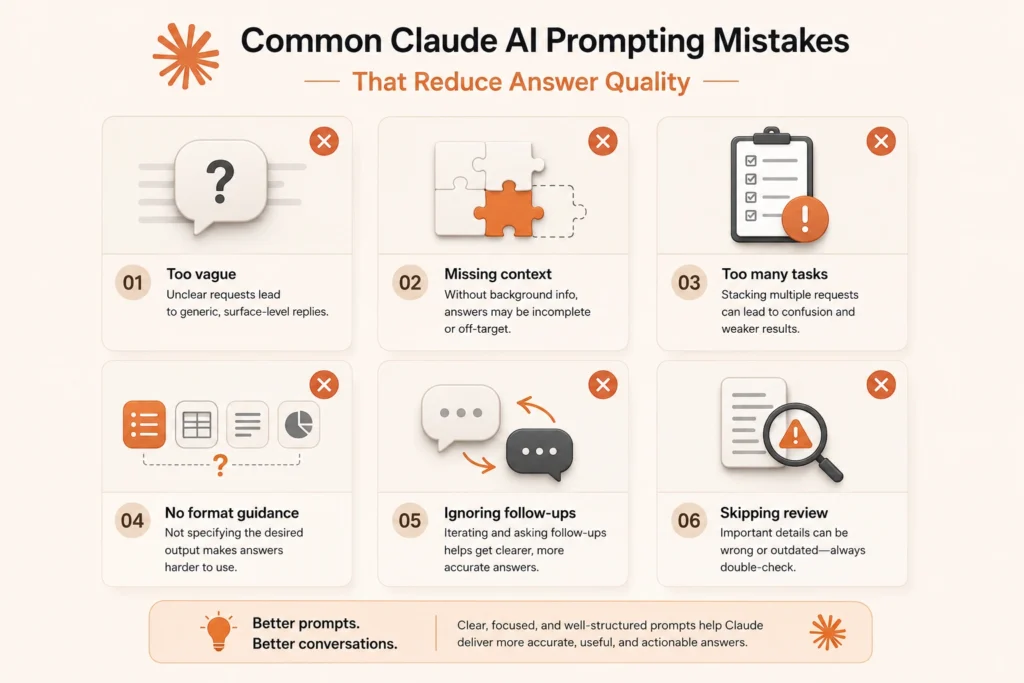
- Using vague prompts: Unclear instructions often lead to generic answers.
- Skipping context: Claude needs background details to provide relevant responses.
- Adding too many tasks: Complex prompts can reduce output quality.
- Not defining the format: Specify whether you need a list, table, summary, or detailed explanation.
- Ignoring follow-up prompts: Refining Claude’s first response often improves results.
- Not reviewing outputs: Always verify important information before using it.
How Claude AI prompts compare with prompts for other AI tools
The general rules applicable to Claude AI prompts are the same as any other AI tool: by providing a clear instruction, relevant context, and the specific goal in mind, one can receive a better output.
Nonetheless, Claude particularly excels in areas such as
- Long-form writing and editing tasks.
- Working with lengthy documents.
- Comprehensive research and summary tasks.
- Logical reasoning tasks.
While ChatGPT, as well as other AI assistants, have several differences in their capabilities, the most productive results in using them can be obtained by choosing prompts that suit the particular AI model and task.
Hence, it is more important to have a strong strategy of prompt use than to rely on one tool only for all tasks.
Additionally, users can learn more about effective prompt practices and Claude’s capabilities through the official Anthropic Claude documentation.
How to build your own Claude AI prompt library
Creating a personal Claude AI prompt library helps users save time and reuse prompts that deliver strong results.
A useful prompt library can include categories like:
- Writing and content creation prompts
- Research and analysis prompts
- Productivity prompts
- Coding prompts
- Marketing prompts
- Learning prompts
Users should update their saved prompts based on what works best and remove prompts that produce weak results.
Building a personal prompt collection helps users save their best workflows. Users can also explore more examples through Aadhunik AI’s AI prompts library.
The best Claude AI users do one thing differently
The best Claude AI users do not just ask questions. They create clear prompts that explain their goals, provide context, and guide Claude toward the desired outcome.
A strong prompt system helps users save time, improve consistency, and get better results across writing, research, coding, and daily workflows.
Better prompts turn Claude from a simple chatbot into a reliable AI assistant that can support real-world tasks.
FAQs
The best Claude AI prompts include clear instructions, relevant context, and a specific goal. Additionally, prompts for writing, research, coding, productivity, and business tasks help users get more accurate, useful, and consistent responses.
Users can get better answers from Claude AI by providing detailed instructions, adding relevant context, defining the desired format, and using follow-up prompts to further improve responses.
A good Claude AI prompt should first explain the task, then provide background details, also mention the target audience, and finally specify the expected output format.
Claude AI prompts can help with various tasks, including content creation, research, document analysis, coding, marketing strategies, learning, brainstorming, and productivity workflows.
Users can find Claude AI prompt examples through AI prompt libraries, workflow guides, and curated collections. Building a personal prompt library can also help create faster and more consistent AI workflows.
