
If you’ve spent time on YouTube or Instagram in the last year, you may have seen a YouTube video and not known it was from Veed.io. It’s possible that many of the video clips and highlighting captions you may have seen on social media are a product of Veed.io.
However, being popular doesn’t mean worth your money. We took our time design a set of tests including the AI captions, remove background noise, create video and other tools in place.
In short, it depends on who is using it and the outcome can be different depending on the user. Our Veed.io review answers the question if Veed.io is really worth investing on.
What is Veed.io?
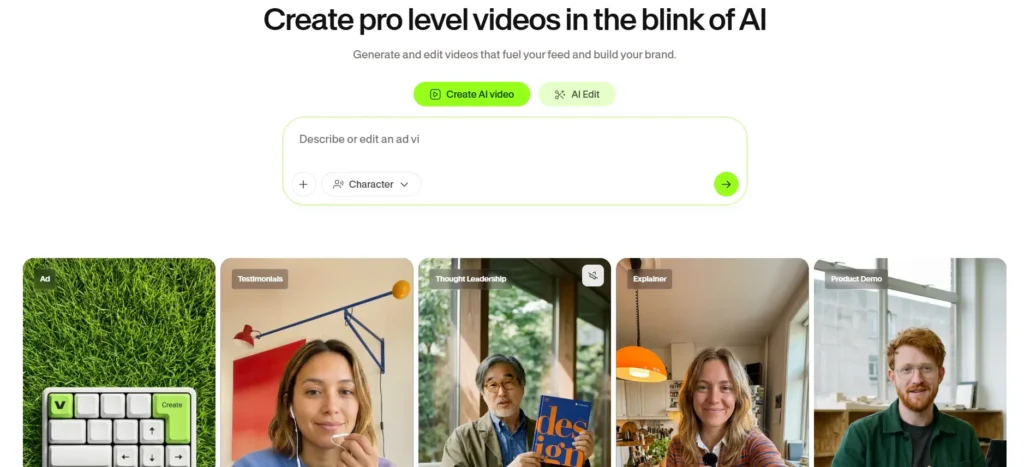
Veed.io is a web platform that works as an AI video editor which does not require users to download anything or install any software. It has evolved from a basic subtitle tool to a video editing program used by millions of people around the world. If you want to see how it works, check out our comprehensive Veed.io tutorial that covers everything about Veed.io in detail.
Feature-by-feature evaluation
AI captions and subtitles – the reason most people come here
The main feature offered by Veed.io is auto-captions, and it does that best. Veed.io claims the transcription accuracy is close to 98%, which conforms to users’ feedback on Reddit, G2 and Capterra. For most types of content, such as indoor interviews, voiceovers, and tutorial recordings, subtitles produced with this tool don’t need much editing, if any.
The variety of styling options is astonishing. Veed has numerous animated caption templates, including current trends used by content creators widely on social media. One can easily play with font type, colour, position, and the way of the text displayed and downloaded – either in the video as burned captions or separately as SRT/VTT files.
However, it is important to note that the accuracy drops down when working with strong accents, technical terminology, and high speed of speech. Background noise in outdoor recordings can easily lead to problems with transcription quality. However, it is definitely the fastest and driest captioning tool available today.
With the free plan, users are limited to 30 minutes of captions produced. If working with a webinar that is 45 minutes long, users will definitely reach the limit halfway through the process.
Background noise removal and Studio Sound – does it actually work?
Veed offers two distinct audio improvement tools that often get conflated:
The process of background noise removal allows the audio to be purified by eliminating various unwanted sounds like buzzing, hissing, noises caused by typing on keyboards, and other noises produced by the environment. The effectiveness of this technique can be appreciated when speaking about audio recorded in a room with sufficient acoustics. When using it outside or for audio taken on phones in places where noise is present, one can see improvements, but they aren’t too pronounced. Voices become muffed, so it is suggested to perform several tests to find the right level of disturbance removal.
Studio Sound is a further step in audio editing. According to users on Reddit, this AI tool is useful in making poor audio from cheap equipment sound like audio recorded at professional studios. Users say that Studio Sound is one of the most underrated options from Veed. Because it helps create amazing audio without having to buy expensive microphones and other tools.
Both functions can be used starting from the Basic plan.
In case you are searching for a committed “voice enhancer” or a separate audio editor, Veed does not offer either functionality under such name. Instead, employing the Studio Sound and background noise removal features takes care of most routine audio editing without the need for a separate application.
AI voice and text-to-speech – good range, one notable gap
The text-to-speech products of Veed.io can convert any written content into voiceovers with the help of voices powered by AI. Voice library of the program includes different languages, accents, and ways of speaking. Quality is pretty good for making explainer videos, product demos, and educational materials.
One option called Regenerate Speech deserves special attention. This option allows recording own voice after some mistake is made in pronouncing a word. Because of this function it becomes easy to rewrite one word or even a phrase by recording it again with the same AI-generated audio.
One downside should be mentioned, as some comparisons show that in terms of fully-automated voicing for texts, Veed underperforms comparing to its competitors like Synthesia. The platform produces separate audio clips instead of automated narration. Though for social media this is not a big matter. It is worth mentioning for those people who make content in bulk.
AI video generation (text-to-video, blog-to-video, slide-to-video) – promising but still developing
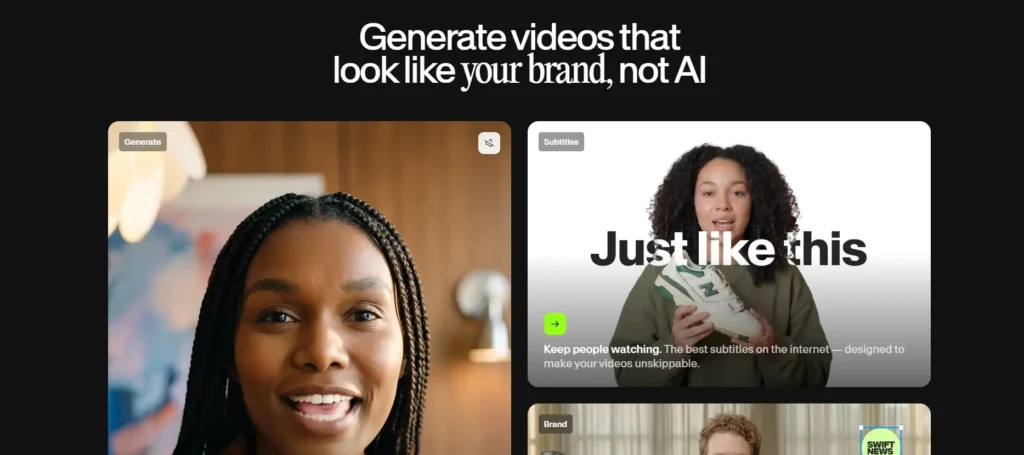
Veed now offers three AI video generation tools, and they serve distinct purposes:
Text-to-video works with a script or prompt and puts together a rough video cut using stock video clips. AI narration, and automatically created subtitles. The results are fine for internal communications, speedy explainer videos, and social media posts. But is no where close to reach the standards of properly produced work. There are times that the stock images used just don’t work, as AI prefers standard video clips.
Blog-to-video is great for repurposing useful written content. Just copy the URL or text of the article and Veed will create a video from it. Making it easier for marketers who want to bring their articles to social media.
Slide-to-video turns power point presentations into videos with AI narration. This is a time-saver for educators who create courses.
According to one Reddit thread in r/videoediting, AI video is “a great draft that needs 20 minutes of work” – and it accurately describes the essence of the AI video produced.
Important credit note:
Generality in AI video generation consumes a portion of Veed’s credits heavily. High-quality video generation like Google Veo 2 consumes many credits. One reviewer in Trustpilot mentioned that they spent their credits within one month as they kept doing projects repeatedly. If you want to use this feature, you need to be prudent in credit budgeting.
Remove Retakes and filler word removal – a surprisingly powerful combination
Remove Retakes is a feature of Veed’s AI application that automatically identifies and removes pauses, restarts and retakes from your footage. The tool is especially effective for screen recordings and camera footage. Because it detects the moments when the speaker hesitated, rewound a sentence or stopped for a long period. It will cut those pauses automatically, eliminating the necessity of watching the footage timeline manually.
The filler word removal tool works in conjunction with this feature and removes distracting words like: um, uh, like, you know etc. Although the tool works normally, sometimes the speech rate is too high for the application to cut the filler sounds properly.
For an independent video profession who is creating a sub-genre of video content, the combination of the two tools can save you more than 50% of the editing time.
Color correction and visual effects – functional, not professional
The color grading features of Veed include among basic aspects: brightness, contrast, saturation and a collection of preset filters like glitches and others. These tools are suitable for the content you post on various social media since you’d rather attain a nice appearance.
But we can say that it is not a professional tool for color grading since there is no curve tool, LUTs, or the secondary color grading functions. If you are coming from Da Vinci Resolve or Adobe Premiere Pro, you will realize that those options around color correction are extremely limited. This is intentional because Veed is developed with speed in mind, not quality.
If we’re talking about the functions that the filter library provides, they are suitable for the videos you post on Youtube and for short clips. However, this is not a very good choice for full-length movies.
Background remover and background changer – solid for simple use cases
AI background removal works extremely well on footage shot under ideal conditions: for instance, when there is a clearly visible demarcation between the background and the subject of the footage. As in the case of a person standing before a simple wall, or a talking head in a well-lit room because it can detect edges accurately under such conditions and produce a clean result.
However, the technology does not function very well with more complicated background options, such as shots taken outside and moving backgrounds. Independent testing indicates that this technology may perform well enough for producing social media posts. But is not sufficient for broadcast quality footage or any serious work with clients.
Background replacement methods include inserting plain colours, application of stock photos, as well as personal images uploaded by users. It is also possible to blur the original background, instead of removing it altogether.
Podcast editing – better than expected, with caveats
Veed has emerged behind the scenes to prove to be beneficial for the podcasters who would like to turn their audio stuff into videos. The technological capabilities of the platform, such as noise reduction and Studio Sound, are effective when it comes to the voice recording; the auto-captioning feature ensures fast transcripts turn around, while the export possibilities make the dimensions of the audiogram-style social media videos.
However, where the platform does not really shine is audio projects that are longer than average. If one needs to deal with a 90-minute long episode featuring numerous interviewees, then the performance of the browser-based app leaves much to be desired.
Summarizing, the conclusion that can be drawn from the use of this innovation in the world of podcasting is that it is great for making excerpts from podcasts and creating audiograms.
Webinar and long-form video editing – know its limits
The situation with podcast editing is quite similar. Veed can manage long videos, but its effectiveness diminishes on videos longer than 30-40 minutes in length, depending on plan and internet speed. This is noted by several G2 reviewers from the mid-market segment who have pointed this out as a drawback for webinars.
If you need to edit a one-hour webinar video down to 5 minutes, Vedd will be fine. However, if you want to do more serious edits on a longer 90-minute video, be prepared for freezes and rendering delays as users have warned on Capterra.
Collaborative editing – functional but basic
The collaboration tools offered by Veed allow several members of a team to access the shared spaces of projects, comment and use the common media libraries and brand kits. This is particularly beneficial for small marketing teams that generate social media content together.
What it lacks is co-editing in real-time, version history (one reviewer from Capterra shared the experience of losing work because “the system went back to earlier versions without any notification”), granular approval workflows.
For the content production of an agency with many editors and formal production processes, these flaws are significant. For a small team of two to three persons producing content, this might work.
Green screen – reliable for standard use
Veed offers an effective chroma key feature for its users with actual green screens. Clean edges are produced, and the replace options are the same as those offered by the AI tool. If you’re recording a video and would like to enjoy a perfect background, this tool comes in handy. You don’t need to spend thousands of bucks on complicated setups.
YouTube Shorts and social media clip maker – one of the strongest use cases
One of Veed’s easiest methods is changing video size for different platforms. Users can modify video aspect ratios (from 16:9 to 9:16 for Shorts, and so on) through auto-reframing. That keeps the subject where it should be, making it perfect to editing talk-head shots with stationary subjects
The software allows the direct publishing of videos on social media sites such as YouTube, TikTok, Instagram, and LinkedIn, thus eliminating the need to download and upload the files. All creators who need to distribute their message through several platforms will benefit from this functionality.
Veed.io free plan: what you actually get
Veed’s marketing may imply its free plan offers more than it actually does. Here’s what the free plan entails:
What is available in the free plan:
- Editing on your browser and using the timeline
- Automated subtitles, with an availability limit of 30 minutes of source material monthly
- Screen recording through video capture
- Exports only available at 720p resolution
- 1GB of free cloud storage
- Basic tools for editing (merge, cut, change the speed, etc)
What is lacking:
- Veed.io watermark added to all productions
- Veed limits you to videos only 10 minutes long
- There is no access to AI video production
- Veed does not provide advanced templates and brand kit
- Limited access to its media library
When it comes to the honest evaluation, the free plan can be useful. It can help you see if Veed works in your case. But due to 10-minute limit, watermarking and 30-minute cap on subtitle creating, the plan is impossible to use on a regular basis.
Pricing: what you need to know before you pay
Veed has five pricing options: Free, Basic ($12/month), Pro ($24/month), Studio ($39/month), and Enterprise Plans. The complete details of these tiers can be seen in our Veed.io guide. Basic plan helps creators in removing their video watermark, while Pro enables them with full AI features.
The pricing page doesn’t mention that AI credits will be consumed whenever a user performs any function. For instance: if you are making a video, you will be charged for every retry, every iteration, and every change. One Reddit user described this by saying that you will be charged even before the rendering of videos is completed. You should have 30-50% extra credits in your budget.
Is Veed.io safe?
To answer your question, yes, Veed.io is a legitimate and established firm. Founded in 2018 and based in London, Veed has established itself as a resource for millions of users and attracted lots of funding through venture capital.
A data breach incident was reported in 2019 in connection with a misconfigured storage bucket, but it was resolved later. The company claims it complies with the GDPR and has a privacy and security policy available on its website.
As far as practical considerations go, there is one thing to keep in mind – the uploaded videos will be stored on the servers of Veed. In their privacy policy, the company explains the retention of data. Therefore, if your video products are classified as sensitive, proprietary, or confidential, it is better to check their privacy policy and think twice before proceeding. However, if you deal with standard content creation or digital marketing, using Veed should not be a problem.
Who should use Veed.io – and who shouldn’t
Use Veed.io if you are:
- An individual involved in video production. Who seeks a solution that generates quick captions quickly and in as few clicks as possible.
- An influencer or marketer producing Instagram Reels, TikToks, or content for many social media channels at once. Where the convenience of the video resizer and social publishing features is essential.
- A teacher or instructor who creates e-learning materials for their class. Who needs a service that can facilitate the production of educational video.
- Students taking online courses who prefer receiving their lectures in video format and find it easier to process the information this way.
- A business owner looking for stylish marketing videos that do not take too long to create — and these are usually produced using a professional video editor.
Don’t use Veed.io if you:
- Seeking advanced color grading, multi-camera editing, or the kind of accurate timeline manipulation that professional editors use.
- Usually deal with video lasting more than 30 to 40 minutes – performance difficulties become very relevant in such circumstances.
- Worried about uploading a sensitive or classified video to a remote server.
- Require offline work of the software – Veed is dependent on the browser only.
- In the process of creating an automated video production process with a high capacity – Veed’s credit system cannot be used for that purpose and it is not that good at scripting.
How Veed.io compares to CapCut and Descript
| Feature | Veed.io | CapCut | Descript |
|---|---|---|---|
| Starting price | Free / $12/mo | Free / $7.99/mo | Free / $12/mo |
| Best for | Social media, captions, marketing | Short-form social videos, effects | Podcasts and long-form video editing |
| AI captions | Excellent (≈98% accuracy) | Very good | Excellent |
| Offline use | No | Yes (desktop app) | Yes (desktop app) |
| Collaboration | Basic | Limited | Strong |
| Free plan quality | Limited (watermark, 10-minute limit) | Generous (no watermark) | Limited (1 hour of transcription) |
| AI video generation | Yes | Yes | No |
| Long-form editing | Struggles with videos over 40 minutes | Handles long videos well | Built for long-form editing |
| Platform | Browser | Browser + Desktop | Browser + Desktop |
Pick CapCut instead of Veed if you are looking for a better free plan, desktop support or enhanced performance for short social content with effects. CapCut also has a far better template gallery when it comes to TikTok alike content.
Pick Descript instead of Veed if you are producing podcasts, long videos and any material that requires editing through transcripts. Descript is much ahead of Veed in terms of text editing processes for longer content.
Stay with Veed if you mostly need AI subtitles, want all-in-one browser-based application for your social video project or require translation.
Final verdict
Veed.io is famous for a reason – only it serves a particular audience. If you create videos or are a social media manager or marketer who manages short or medium length video and is looking for the quickest, most accurate and most integrated captioning and exporting tool available, you will find Veed.io Pro is well worth the annual fee of $24/month.
If you are a professional video editor, a person who frequently uses long content or need serious color correction and offline access, you will experience frustration. The program knows its limits and is very effective in what it does – it just doesn’t try to act like Premiere Pro.
When one talks about areas where Veed needs improvement, credits come to mind as the first one. The current system discourages experimenting since it operates against what the program offers and creates problems for experimenters.
For now: try the free plan to experiment with the interface, and then switch to the Basic or Pro plans once you know that it works for you. The transition from free plan to paid is the biggest upgrade of the service – and it pays for itself quickly for publishers. If you want to see how all functions work before making up your mind, check out our Veed.io step-by-step guide to learn how to use the program.
FAQs
Indeed. Veed.io is an established firm that was established in 2018 and is located in London and has numerous users as well as investments. The company sustained a data breach as a result of a poorly set up storage bucket on its system back in 2019, and this issue has been addressed.
Yes. Screen recording is included even on the free plan, alongside browser-based timeline editing.
Yes. The filler word remover tool is used along with the Remove Retakes function to get rid of pauses and repeats in videos. Hence, both tools save a significant amount of editing time, provided that the filler word detection is unable to spot words in fast speech.
Yes. Veed allows for seamless publishing to key social media platforms like YouTube, TikTok, Instagram, and LinkedIn directly from their website without requiring the hassle of downloading and re-uploading files. However, it lacks options for scheduling and automating posting on social media.
