
Google just gave Gemini a new skill called agentic video. This gives Gemini the ability to analyze videos at a more advanced level than just being faster, because instead of analyzing every single frame of a video, Gemini is capable of filtering what’s necessary.
As a result, there will be less errors, lower expenses, and faster solutions. This is very important when it comes to the use of Gemini or development of applications using Gemini’s video features. Here’s everything you need to know:
What is agentic video in Gemini?
Agentic video is a new approach to how Gemini engages with video. Typically, an AI will scan videos frame by frame, at fixed speed. Agentic video is innovative in its workings.
With Agentic video, Gemini acts as a smart viewer, only selecting the parts that are worth watching. It is also capable of switching from watching the video to either listening to the audio or reading transcripts.
- Gemini determines what to watch,
- Gemini determines how fast to watch it,
- Gemini decides whether to use video, audio, or text.
How does agentic video actually work?
You can think of the old method as viewing a film in an automatic mode, viewing each image from beginning to end without any interruption. Agentic video works similarly to watching the best moments of the film by skipping to significant scenes.
Gemini works through small cycles where it analyzes the video, finds the important part and focuses on it. This cycle is repeated until enough information is gathered.
The process is automatic, meaning that developers do not have to implement any additional programming.
Agentic video vs old video processing: what changed?
Here is a simple side-by-side look at the two methods:
| Feature | Traditional video processing | Agentic video understanding |
|---|---|---|
| Frame checking | Fixed rate, typically 1 frame per second | Gemini decides which frames to analyze |
| Token usage | High, especially for long videos | Up to 88% lower |
| Cost | Higher for long videos | Up to 66% lower |
| Accuracy | Baseline | Up to 7% better |
| Best for | Short clips and simple video analysis | Long videos, lectures, meetings, and recordings |
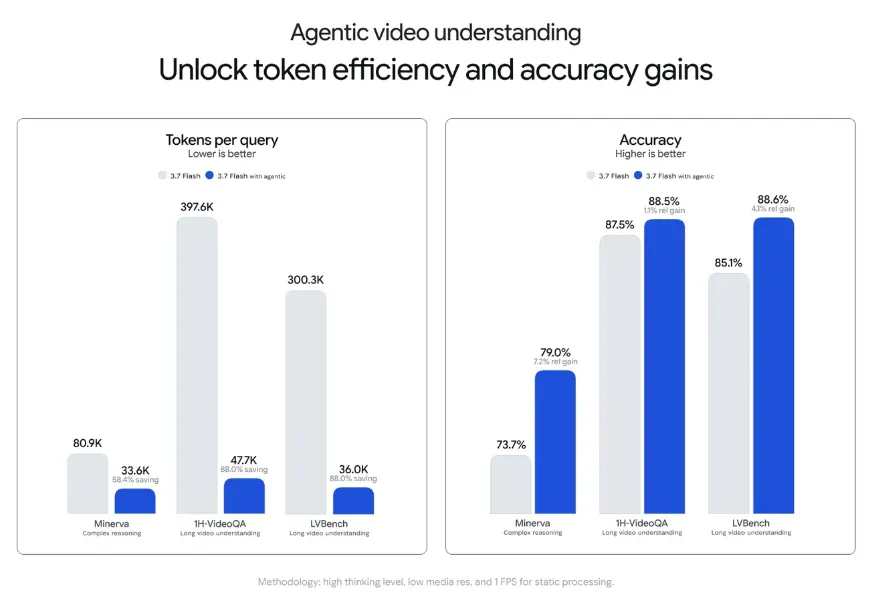
The biggest jump shows up in long videos. Think 10-minute tutorials, 90-minute lectures, or hours-long recordings
What can agentic video actually do?
Agentic video refers to a unique process that goes beyond saving some money.
- Identify precise instant: One benefit of its function is the ability to figure out the very instant of the change of what is happening in video.
- Explore long videos: It also has an ability to ask questions about long multi-hour video, without generating tons of tokens.
- Detect anomalies: Spotted incongruity in a fast or otherwise astonishing event will make people slow down for a moment.
- Count with precision: It helps to account repeated actions or objects, such as counting repetitions in workout fitness videos.
If you work with different video technologies yourself, this is a kind of intelligent processing worth monitoring. The same idea lies behind tools such as Kling AI and its detailed guide to the process of video creation with AI.
Which Gemini models support agentic video?
Currently, Agentic video uses three models:
- Gemini 3.7 Flash
- Gemini 3.6 Flash
- Gemini 3.5 Flash-Lite
Among these three models, Gemini 3.7 Flash produces the best results because it has the best combination of precision and affordability.
However, Agentic video doesn’t have to be the only company trying to create faster and cheaper models. If you want to see how the competition stands in comparison, read our comparison of GPT-5.3 vs GPT-5.5 Instant to find out what has changed at OpenAI.
How do I turn on agentic video?
Integrating this option is very easy if you use the Gemini API. There’s no need to get any new plans or a special key.
You need to:
- Access Google AI Studio or Gemini Enterprise Agent Platform
- In your API request, turn on video processing into “agentic”
- Send the video and question, as you would normally do now.
It is free to use this option. The costing for this is just the regular Gemini API token pricing. The Google announcement has everything about implementation in detail.
Where will agentic video show up next?
Currently, agentic video is accessible to developers through the API, but it’s not the end of the road for Google.
The tool will soon be available to average users on the Gemini app
Furthermore, YouTube will utilize this tech to support its “Ask YouTube” feature, which will provide insights based on the video itself.
That means that not only developers will get to enjoy the tool shortly.
Moreover, the trend of developing effective and inexpensive AI models isn’t limited only to Google. Release of such tools as Claude Opus 5 highlights a similar tendency across the sector.
Key takeaways
Agentic video is the newest improvement of how Gemini comprehends moving images, and it allows Gemini to select what to watch, instead of scanning through every frame at a certain speed. This reduces tokens needed by as much as 88%, lowers prices by up to 66%, and increases accuracy by about 7%, especially for longer videos.
It is already operational in Gemini 3.7 Flash, 3.6 Flash and 3.5 Flash-Lite via the API and soon will be accessible via Gemini app and YouTube. The introduction of this new feature is great news for all those working with video.
FAQs
Currently, agentic video was specifically designed for uploaded video files as well as YouTube links delivered via API and cannot be applied to real-time video streaming at this moment.
Unfortunately, the agentic video can only be utilized with the three latest versions of Flash technology. All earlier versions and other models that are not based on Flash technology will not get this feature.
The feature is not going on automatically. Developers need to set the processing option to `agentic” in the API call. In absence of this setting, the model will continue utilizing the traditional frame rate method.
Not really. Because Gemini omits the unnecessary frames, it handles lengthy videos faster than its predecessors.
No. It operates under the same pricing as Gemini API token, meaning Google has not charged anything extra to enable this feature.
