

AI tools have changed how content gets created. You can generate blog posts, captions, and even full articles in seconds. But speed comes with a downside: most AI-generated content sounds robotic, repetitive, and engaging.
This happens because AI relies on patterns and data, not human thinking. It does not understand emotions, intent, or context. As a result, the content often feels flat, generic, and easy to identify as machine-written.
You can fix this. By improving tone, structure, and readability, you can turn AI drafts into natural, human-like content. into natural, human-like content. In this guide, you will learn how to make AI content sound human, so it connects better with readers, builds trust, and performs well in search.
Common patterns in AI writing
AI content follows predictable patterns:
- The use of repetitive sentences
- Use of a generalized introduction without any attention grabber
- Maintaining an objective approach without expressing opinions
Such a repetitive nature of writing makes the AI content predictable and boring.
For a deeper look at how AI is used beyond writing in research and knowledge work, read our guide on AI for academic research.
How to add a conversational tone
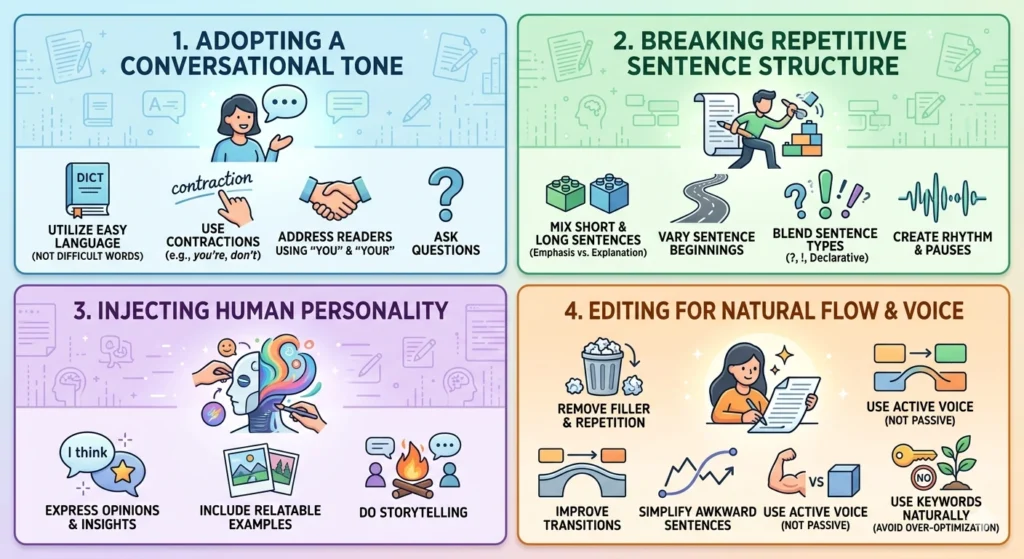
To make your AI-generated content sound human, you need to change the tone from formal to conversational. To do so, you should concentrate on:
- Using easy language instead of complex words
- Using contractions such as “you’re,” “it’s,” and “don’t.”
- Addressing the reader with “you” and “your.”
- Asking questions
Example:
AI version: “One must ensure that the content is optimized for better engagement.”
Human version: “You should make your content more engaging.”
Thus, you can make your AI-generated content more conversational in nature.
How to break repetitive sentence structure
AI writes repetitive sentence structures that make the writing monotonous.
Fix this by:
- Short sentences for emphasis and long sentences for explanations
- Varying sentence beginnings
- Mixing questions and statements
- Adding pauses for rhythm
Example:
AI version: “AI content is fast. AI content is efficient. AI content is useful.”
Human version: “AI content is fast and efficient, but you still need to refine it to make it truly useful.”
A varied sentence structure keeps the audience interested and readable.
How to add human personality
AI has no personality, so you need to inject one:
- Express opinions/insights
- Include relatable examples
- Use storytelling
For example,
Rather than saying, “This will increase engagement.”
Try this: “As someone who has used this technique, I’ve doubled the engagement in my blogs.”
This makes the content more authentic and experience-based.
To see how brands are applying AI with a more natural and human touch, read our guide on humanized AI marketing.
How to edit AI content for natural flow
Editing is where AI content becomes human:
- Remove filler words and repetition
- Improve transitions
- Simplify awkward sentences
Example:
AI version: “It is important to note that this method can be considered effective.”
Human version: “This method works well.”
Cleaner writing always feels more natural.
How to use the active voice instead of the passive voice
Active voice makes writing clearer and stronger:
- Keep sentences direct
- Let the subject perform the action
- Avoid complexity
Example:
Passive: “The content can be improved by using a better structure.”
Active: “You can improve the content by using a better structure.”
Active voice is more natural and engaging.
How to avoid over-optimization in AI content
AI overuses keywords, causing your copy to sound very artificial. Therefore, you should:
- Use your keywords naturally
- Avoid repetition
- Focus on readability
Example:
Over-optimized: “AI content writing tools aid in AI content writing and AI content generation.”
Natural: “AI can be used to generate content fast and effectively.”
Top tools that instantly make AI content sound human
You can improve AI content using tools that refine tone, clarity, and flow. This helps create natural-sounding writing with:
1. Grammarly
Overview: Writing assistant enhancing tone, grammar, and readability to improve the flow of the content.
Features:
- Detection and suggestion of tone
- Improvement of grammatical correctness
- Improvement of readability
- Eliminating stilted writing
- Immediate feedback on writing
Pricing: Free version offered. The premium version starts at approximately $12 per month (annual subscription).
Best for / when to use: Use Grammarly when you want to quickly polish content, fix awkward phrasing, and improve overall readability.
2. QuillBot
Overview: An AI-powered paraphrasing tool used to rephrase sentences to improve flow and eliminate robotic phrasing.
Features:
- Paraphrasing in various styles
- Making sentences easier to understand
- Grammar checking tool
- Summarizing sentences
- Removing AI-generated phrasing
- Adjusting tone and fluency settings
Pricing: Free version offered. The premium version starts from about $8–10 per month.
Best for / when to use: Use QuillBot when your content feels repetitive or robotic, and you need quick rewrites without changing meaning.
3. Wordtune
Overview: Sentence rewriting software that improves the flow of your sentences.
Features:
- Rewriting sentences with different tones
- Rewriting with various styles like casual, formal, and expanded
- Improving flow
- Increasing readability
- Adding a natural conversational tone
- Web extension Chrome for real-time edits
Pricing: Free version offered. The premium version starts at approximately $13–24 per month.
Best for / when to use: Use Wordtune when you want to make content more conversational and human-like with better phrasing.
4. Hemingway Editor
Overview: Readability software that simplifies sentences, improves readability, and enhances writing skills.
Features:
- Detects hard sentences to read
- Suggests simplified alternatives
- Decreases the use of passive voice
- Improves sentence flow
- Increases readability score
Pricing: Free online version offered. The desktop application requires purchasing (approximately $20).
Best for / when to use: Use Hemingway when your content feels too complex, long, or hard to read and needs simplification.
How to use AI as a writing assistant, not a writer
Use AI effectively:
- Use it for first drafts and brainstorming
- Edit before publishing
- Add your own insights
Also, for a deeper comparison of AI tools for content writing, read our guide on the Claude vs. ChatGPT vs. Grok content writing comparison.
How to proofread for human readability
Proofreading ensures your content feels natural. You should:
- Read the content aloud to catch awkward phrasing
- Check if it sounds like a real conversation
- Look for unnatural flow
- Make final edits for clarity, tone, and engagement
This step helps you turn good content into great content.
Make AI content sound human and connect better with readers
AI-generated content can be produced quickly, yet it cannot take the place of human judgment, creativity, and voice. The difference between ordinary and top-notch content lies in how well you polish it.
If you put effort into editing the AI-produced content, making it sound right, giving it personality, and arranging it appropriately, you can transform plain text into engaging content that resonates. This is the only way to increase audience interest, earn their trust, and improve SEO ranking.
All you need to do to achieve this goal is never post AI-generated content as is. Instead, regard this text as a draft, and make sure to polish it until it becomes your content created according to your views.
If you practice this approach, no matter how competitive the market becomes due to automation, you will succeed in creating exceptional content.
FAQs
To make AI content sound more human, you should edit it instead of using it directly. First, simplify the language so it feels natural and easy to read. Then, add a conversational tone and avoid repetitive sentences that make the content sound robotic. Include small insights or examples to make it more natural and engaging. Finally, treat AI output as a draft and keep refining it until it sounds human.
AI content sounds robotic because it depends on patterns instead of real understanding. It repeats similar phrases, uses generic wording, and avoids strong opinions. It also lacks emotion and natural tone variation, which makes it feel predictable and less engaging than human writing.
AI content can feel human-like after proper editing. Improving tone, varying sentence structure, and adding original insights make it more natural and engaging. Instead of focusing on making it “undetectable,” the goal should be to create clear, high-quality writing that readers trust.
The fastest way to humanize AI writing is to focus on a few key edits. Start by rewriting the introduction to make it more engaging. Then simplify complex sentences, add contractions, and remove repetitive phrases. Finally, include one or two examples or opinions to make the content feel more personal and real.
Yes, because it improves readability and engagement, which helps reduce bounce rate and improve rankings.
