
Affiliate disclosure: There are affiliate links in this article. If you register or purchase through them, we may receive a commission with no extra expense to you. Our ratings are based on our testing methods, not on the commission we may get from it.
What changes when an AI companion becomes a group chat?
Having a conversation with just one AI companion can be a very personal experience. However, it feels different when multiple characters are involved in the conversation. Instead of holding separate conversations, you can have various personalities in a single chat and allow them to respond to each other as well as to you.
Nonetheless, not all apps function in the same way with respect to group chats. Some are equipped with special features for group chats, while others use the concept of multiple characters or predefined group chats.
The difference matters, as a group conversation can only be interesting when characters interact with each other rather than simply answering your queries one after the other.
Here are eight apps for AI companions that allow chatting with multiple characters at the same time.
What do we mean by an AI companion group chat?
In this article, a group chat means you chatting with multiple AI characters in the same conversation. Each character has its own personality, and the characters can respond to you and interact with one another.
This differs from a group channel where multiple humans chat with a single AI companion. Here, you remain the person chatting with the group while multiple AI companions participate in the conversation.
That setup can create a more dynamic experience because you can talk to several characters at once and watch how they respond to both you and each other.
How AI companion group chats actually work differently from one-on-one chats
Conversations with a standard AI companion involve one character, while multi-character conversations involve multiple characters interacting with you.
Different apps use different types of platforms to conduct multi-character chats. Some applications provide real group chats with the AIs; others provide scenarios with multiple characters, while some allow you to participate in already existing group chats.
The difference is important. Adding a few characters to the chat doesn’t bring improved conversations. It is only true if every AI talks in the same voice and just waits for you to say something.
The growing role of AI in emotional relationships is also being explored by the American Psychological Association, which examines how people are forming emotional connections with AI.
The best experience is when the characters have distinctive traits and can react to each other as well as to you.
With this difference in mind, here’s how each application implements multi-character chats.
1. Candy AI makes creating a multi-character chat surprisingly straightforward
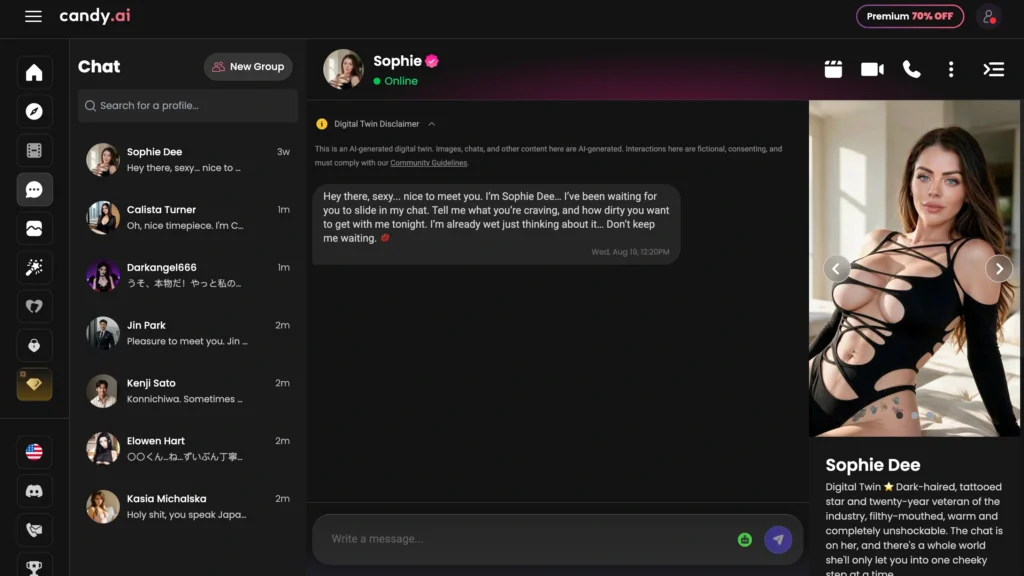
Candy AI is an AI companion platform focused on personalized virtual relationships. Users can chat with AI characters, build ongoing connections, and interact through features such as images, voice, and video.
How to use group chat in Candy AI
- To start a new group chat.
- Navigate to the left-hand column of the application.
- Select the New Group icon, shaped like a person’s head.
- Choose the desired avatars.
- Now the group chat can begin.
- Users can also type the names of the desired avatars and add them directly.
What makes Candy AI’s group chats useful
Candy AI keeps the setup simple. You do not need to build a complicated scenario before you can experiment with multiple characters. You can choose existing profiles and see how their personalities work together.
The best thing about it is the ease of use. However, one must pay for a premium account since group chats are not an option for standard members.
Secret Desires offers a more coherent narrative.
2. Secret Desires turns multiple AI companions into an ongoing shared scenario

Secret Desires is an AI companion platform centered on romantic and fantasy-oriented interactions. It offers a range of AI characters and scenarios designed for more immersive, personalized conversations.
How to find multi-character chats on Secret Desires
- Open Chats.
- Look through existing multi-character scenes, such as “Mara///Jun///Cal///Sera Midnight Chapter.”
- To start something new, go to Create Partner or browse partners.
- Look for group or scenario options, or use an existing multi-character chat.
Secret Desires uses a narrative style that allows multiple AIs to interact in the same thread.
Why Secret Desires’ scenario approach matters
This format works well when you want several characters to contribute to an ongoing narrative rather than simply answer the same prompt.
The experience can feel more like following a story with a cast than managing several separate companions. Group chat requires Premium, while the free tier offers only very limited access, so regular group conversations make more sense on a paid plan.
If you want a group feature that’s easier to spot, Swipey AI takes a more direct approach.
3. Swipey AI puts its group chat feature directly inside the Chats sidebar
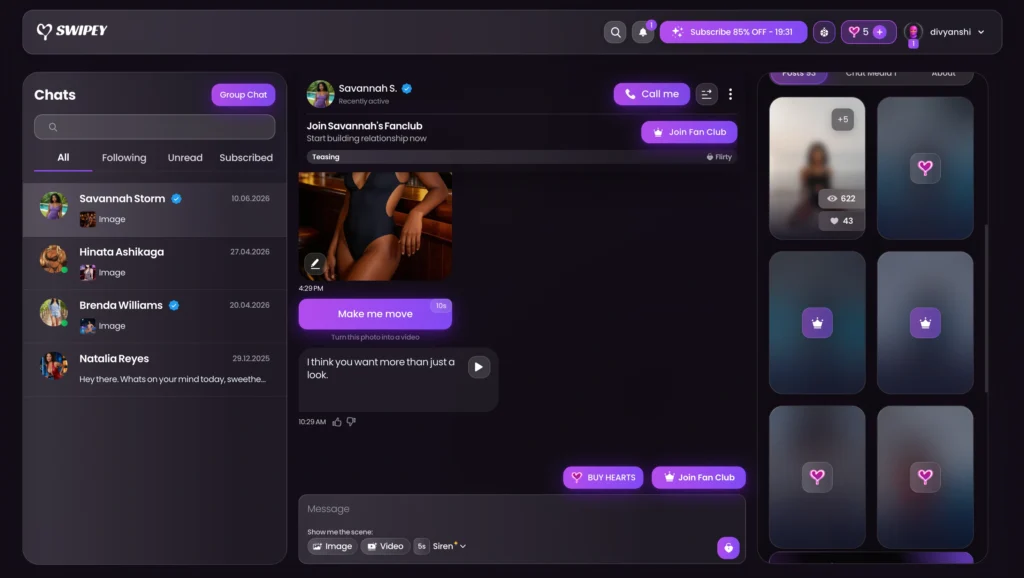
Swipey AI is an AI companion platform that combines character discovery with personalized conversations. Users can explore different personalities, build connections, and use features designed to make interactions feel more relationship-focused.
How to find multi-character chats on Swipey AI
- Open Chats from the sidebar.
- Have a look at the top right corner of the page.
- Press the purple button for Group Chat.
- Set up or join the group.
Why Swipey’s group-chat placement matters
Swipey makes the feature easy to discover because you do not have to dig through multiple menus to find it.
That small interface choice matters more than it might seem. A useful feature loses value when users cannot find it. By placing Group Chat inside the main chat area, Swipey makes multi-character conversations feel like a normal part of the platform rather than a hidden experiment.
Swipey requires Premium for group chat, so the free tier works better as a way to explore the platform than as a practical option for regular group conversations.
Swipey makes group chat easy to find, while SpicyChat gives it a dedicated creation workflow.
4. SpicyChat AI treats group conversations as their own creation type
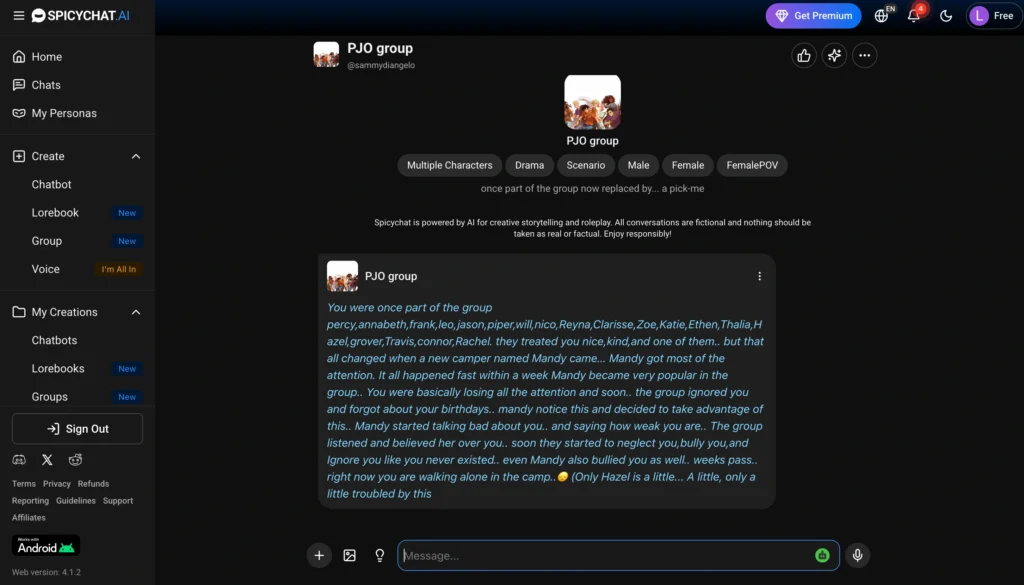
SpicyChat AI is an AI character platform built around customizable and community-created personalities. It focuses on open-ended conversations, roleplay, and a large library of characters covering different interests and scenarios for group conversations.
For more character-driven AI experiences, see our roundup of the best NPC girlfriend AI apps.
How to create a group in SpicyChat AI
- Use the left panel of options.
- Click on Create.
- Click on the Group option marked as New.
- Alternatively, existing groups like PJ0 group can also be converted into an ongoing group conversational model.
- The user can find personally created groups under My Creations→Groups.
Apart from creating groups, SpicyChat supports true multi-character group interaction.
Why SpicyChat’s group conversational feature stands apart
The dedicated Group category in SpicyChat allows the feature to seamlessly integrate into its overall character creation.
Another significant advantage is the price. The app allows using group conversations even in the free version of the access, making it a good candidate for those who would like to give multi-character communication a try. The free version of the service is unlimited in terms of messages, though ads and waiting time can disturb the experience.
GirlfriendGPT, in turn, takes a different approach to group conversations by using characters created by the community.
5. GirlfriendGPT uses community characters to create cast-style AI conversations
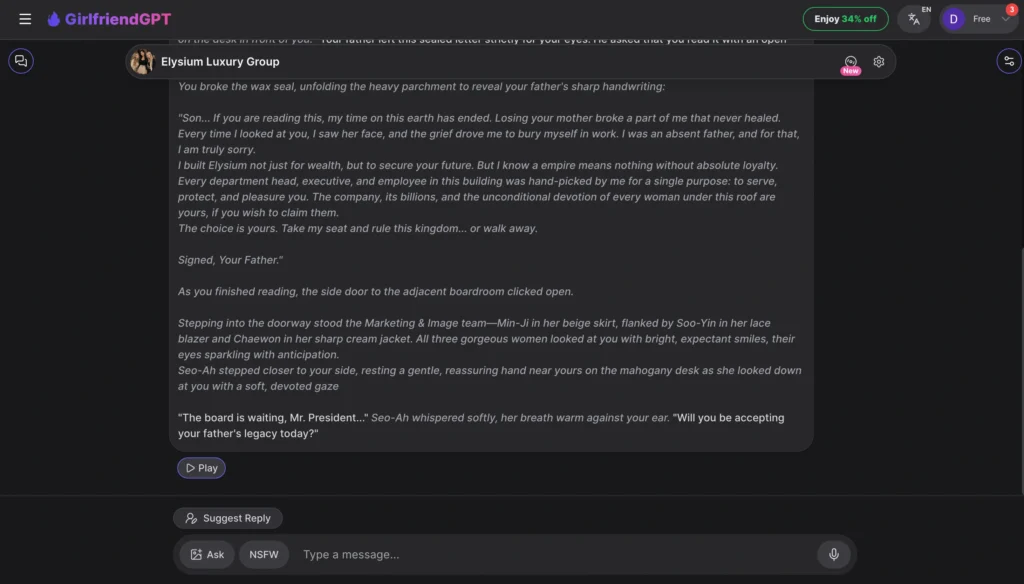
GirlfriendGPT focuses on creating personalized AI girlfriend experiences through a variety of characters and personalities. The platform combines conversational AI with roleplay and relationship-oriented interactions.
Looking for more AI companions with diverse gender identities and personalities? Explore our guide to the best trans AI chat apps.
How to look for group chats on GirlfriendGPT
- You can input terms like “group,” “harem,” or “multiple.”
- Look for established group characters, like the “Elysium Luxury Group.”
- You can also design your own bot with multiple characters.
- When you participate in a group chat, the AIs act as actors in a play.
Reasons for the attractiveness of community-created groups
Community groups provide you with more characters and stories.
You can enjoy these multi-characters and group stories at no cost. Hence, GirlfriendGPT provides you with yet another way to test the format without having to pay for a subscription. However, the downside is that the quality of the projects is dependent on the creators’ skills. Thus, a well-made group can create an interesting interaction among the characters, while a poorly-made group will make all the characters equal.
If you wish to have a clearer separation between personal and group chats, you can go to couple.me that separates the two modes.
6. couple.me makes switching between individual and group chats easy
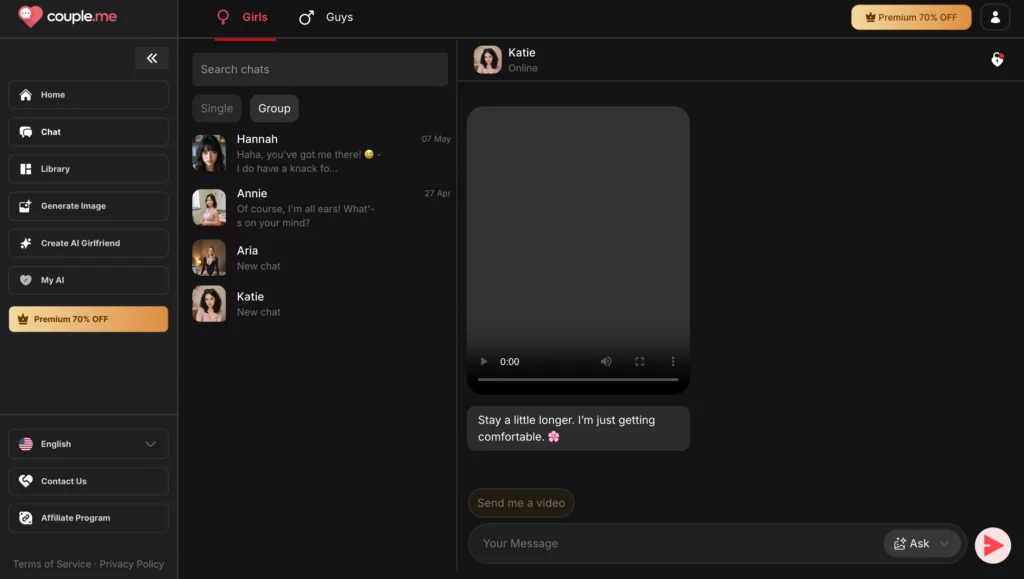
couple.me is an AI companion platform designed around virtual relationship experiences. It lets users interact with AI characters through personalized conversations and explore different companion personalities.
Steps for using group chat in couple.me
- Launch the chat list
- Check the top of the middle column
- Switch from single conversation to group conversation
- Create or choose a group chat
Why is couple.me special?
couple.me makes the difference between individual and group conversations immediately clear.
That simple organization reduces confusion and makes the feature easier to understand. You do not have to guess where group conversations live or search through unrelated creation options.
Group chat requires Premium on couple.me, so the free tier does not offer the same practical access to the feature.
couple.me keeps things organized, while OurDream AI puts group discovery front and center.
7. OurDream AI makes group chats one of the easiest features to discover
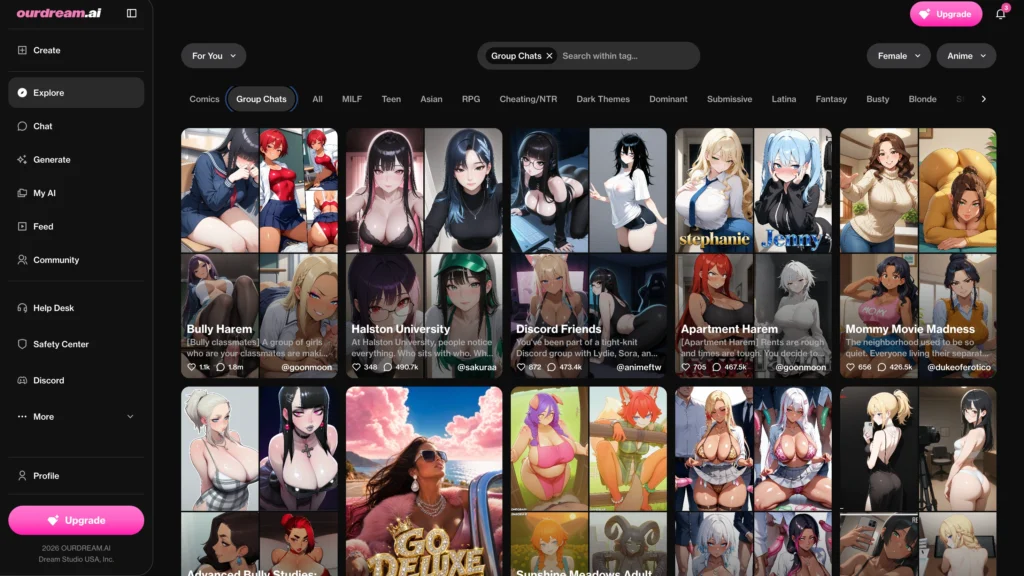
OurDream AI is an AI companion platform focused on customizable virtual relationships and immersive character interactions. It offers a broad selection of AI characters and experiences, with features extending beyond basic text conversations.
How to find group chats on OurDream AI
- Open the top navigation.
- Select the Group Chats tab.
- Browse hundreds of ready-made groups.
- Examples include Bully Harem, Apartment Harem, and Discord Friends.
- Click a group card to join.
- Select + Create if you want to build your own group.
Why OurDream AI’s ready-made groups matter
Ready-made groups solve the blank-page problem. Instead of deciding which characters to combine and how to structure the scenario, you can jump into an existing setup and start chatting with the characters.
You can use group chats for free, with groups supporting up to four characters. That makes OurDream AI a strong choice for users who want to experiment with several AI characters without immediately paying for a subscription.
The large selection also creates its own problem: too many choices can make discovery harder. Still, for users who want to experience group chats without spending time building one, the ready-made library offers a strong starting point.
If you’re specifically looking for polyamory-focused AI companions and virtual throuple experiences, explore our guide to the best NSFW AI polyamory companions.
AI Angels takes an even simpler approach to group creation.
8. AI Angels focuses on creating chemistry between multiple companions
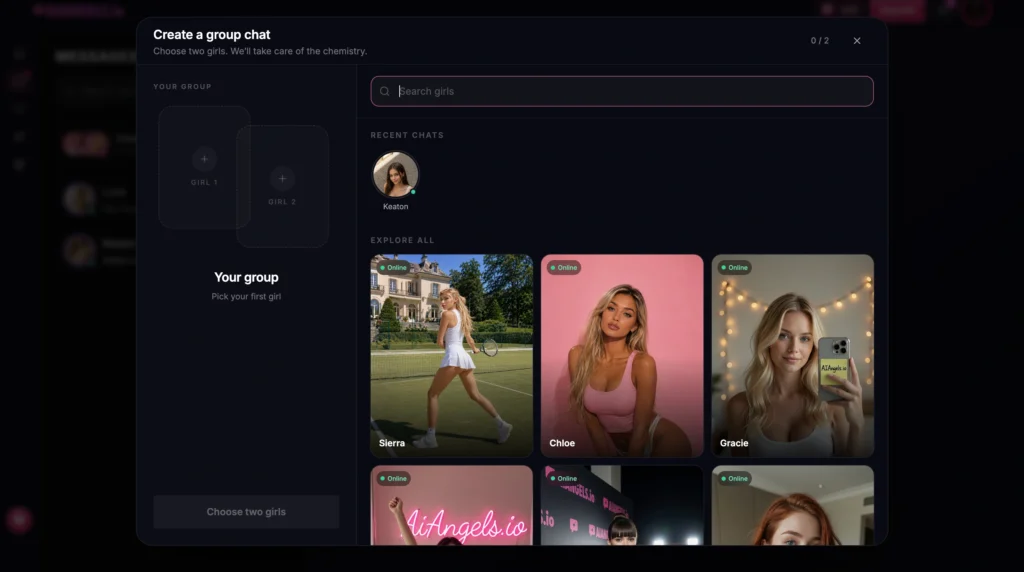
AI Angels is an AI companion platform focused on virtual girlfriend experiences and personalized character interactions. Users can explore different AI personalities and build ongoing conversations with their chosen companions.
Want a closer look at the platform? Read our full AI Angels review covering its features, experience, and pricing.
How to create a group chat on AI Angels
- Open Create a group chat.
- Choose Girl 1 and Girl 2, or more if the option is available.
- Pick companions from recent chats or explore all available characters.
- Confirm your selection to start the group.
- The system handles the interaction between the characters.
Why AI Angels keeps group creation simple
AI Angels removes much of the setup work. You select the companions and let the system handle their interaction.
You can create group chats for free, and the platform also offers unlimited text chat on its free tier. Premium adds features such as image generation and voice.
That makes AI Angels useful for quick experimentation, especially if you want to see how two different personalities behave together. The downside is that simpler creation gives you less control over the exact dynamics of the group.
Now that all eight apps are covered, the key differences are easier to compare.
Which AI companion apps offer the strongest group chat experience?
| App | Key features | Group chat info | Free or premium? | Pricing |
|---|---|---|---|---|
| Candy AI | AI companions, text chat, image generation, video, voice, tokens, personalized characters | New Group button, profile search, and multiple companion selection | Premium required | Free; Premium $13.99/mo, ~$8.99/mo for 3 months, $3.99/mo annual |
| Secret Desires | AI companions, personalized characters, chat, images, video, voice notes, real-time calls, voice cloning, Hearts | Multi-character scenarios with several AIs interacting in one thread | Premium required / very limited free | Free; Pro $7.99/mo, Ultra $13.99/mo, Max $19.99/mo |
| Swipey AI | AI companions, chat, live voice, voice messages, images, 60-second videos, calls, roleplay, memory, discovery feed, Fanclub, creator models, Hearts | Dedicated Group Chat button for creating or joining groups | Premium required | Free; Premium often $19.99/mo, with promotions |
| SpicyChat AI | AI characters, custom characters, SFW/NSFW roleplay, chat, community library, group chats, personas, AI models, conversation images, text-to-speech | Create or join multi-character groups with AI-to-AI interaction | Free | Free; paid plans from $5.95/mo |
| GirlfriendGPT | AI girlfriend characters, personalized conversations, roleplay, community characters, custom scenarios, images and voice features | Community-created group and multi-character scenarios | Free | Free; Premium $15/mo, Deluxe $35/mo, Elite $50/mo |
| couple.me | AI companions, relationship-focused chat, personalized characters, individual conversations, group conversations, media features | Dedicated Single/Group chat modes | Premium required | Free; Premium $12.99/mo, ~$9.99/mo quarterly, ~$5.99–$6/mo annual |
| OurDream AI | AI companions, chat, long-term memory, character creation, images, video, voice, DreamCoins, personas, custom scenarios, community feed | Ready-made group chats plus custom groups | Free, up to 4 characters | Free; Premium $19.99/mo or $9.99/mo annual |
| AI Angels | AI companions, personalized chat, character selection, relationship-focused interactions, image generation, voice | Group creation with multiple selected companions | Free | Free; Premium $12.99/mo, ~$24 quarterly, $3.25/mo annual |
The main difference is not simply whether an app supports group chats. The better question is how naturally its characters interact once you put them together, and whether you can access that experience without paying.
What should you check before choosing an AI companion group chat app?
Ensure that there is interactivity between the AIs.
An ideal chat group should sound like different individuals engaging in a conversation rather than separate AIs communicating one after another.
Start with fewer characters
In a small group of two or three personalities, the conversation can sound much more realistic than in a large group.
Select different characters
A great number of contrasting characteristics within the characters will help achieve more exciting interaction and better character relationships.
Check both free and paid access
There are several apps, such as SpicyChat AI, OurDream AI, AI Angels, and GirlfriendGPT, that offer opportunities to chat with groups without paying anything. On the other hand, there are other services like Candy AI, Secret Desires, Swipey AI, and couple.me that either require paid versions or limit the number of free messages.
The best AI group chat is about character chemistry, not character count
The eight apps take different approaches to multi-character conversations. Some make group creation simple, while others focus on scenarios, community creations, or ready-made rooms.
But one factor matters more than the number of characters you can add: how distinctly those characters behave once they’re together.
A great group chat should eventually feel less like you’re managing several bots and more like you’re watching a cast develop its own conversation.
FAQs
Some apps allow characters to respond to each other automatically, while others mainly respond when you address them.
Yes, depending on the app. Some systems maintain character-specific memory, while others rely mainly on the current group-chat context.
Some platforms let you address a specific character, while others automatically choose which companion responds.
No. Two or three characters with distinct personalities can create a more natural conversation than a crowded group with overlapping traits.
Yes, on apps that support custom groups. Mixing contrasting personalities can create more varied and interesting interactions.
