

Claude AI pricing is one of the most searched terms in the world, and it’s easy to understand why: increasingly, people are turning to AI as a way of writing content, coding, or even doing research. Picking the wrong Claude plan can mean paying for features you’ll never use or hitting frustrating usage limits when you need the AI most. Understanding where each plan shines can save both money and time. A question that many people have about using AI, though, is understanding the boundaries of what they can actually achieve with the tools they use. To help everyone understand which plan best suits their needs, we’ve compiled this simple guide.
The Claude AI pricing comparison that shows every plan at a glance
| Plan | Monthly Price |
|---|---|
| Free | $0 |
| Pro | $20/month |
| Max 5x | $100/month |
| Max 20x | $200/month |
| Team Standard | $25/user/month (annual) |
| Team Premium | $125-$150/user/month |
| Enterprise | Custom |
While pricing differences are easy to spot, the real question is what you actually gain when you move between tiers.
Claude AI pricing looks simple until you compare what each tier actually offers
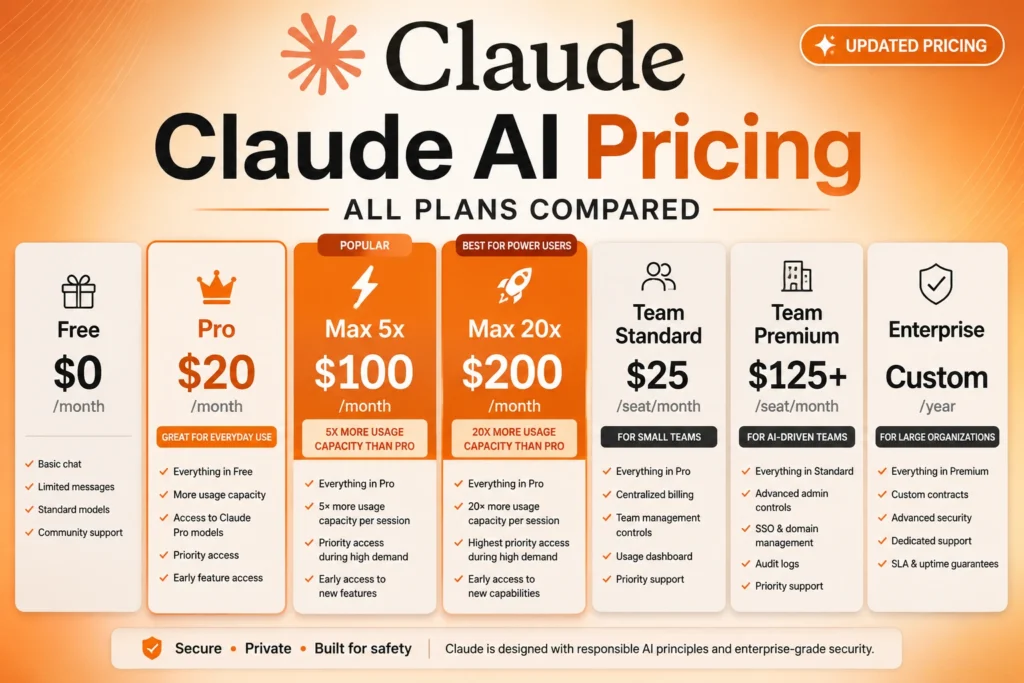
You can check the latest upgrade pricing information on the upgrade page.
Below are the Claude AI plans, along with the prices:
- Free Plan: $0/month
- Pro Plan: $20/month (billed monthly) or $17/month (billed annually)
- Max 5x Plan: $100/month, providing approximately 5× the usage capacity per session than the Pro plan.
- Max 20x Plan: $200/month, which provides approximately 20× more usage capacity per session than the Pro plan.
For users in India, the prices are as follows:
- Free Plan: $0/month
- Pro Plan: $20/month (approximately ₹1,700–₹2,000)
- Max 5x Plan: $100/month (approximately ₹8,500–₹10,000)
- Max 20x Plan: $200/month (approximately ₹17,000–₹20,000)
*Actual INR pricing varies based on GST, exchange rates, bank conversion fees, and app-store charges.
Most users dramatically overestimate how much AI usage they need. Unless Claude is part of your daily work, Max 20x can be difficult to justify financially.
Price is only part of the story. The real difference becomes clear when you look at what each plan actually unlocks.
To understand the differences between Claude’s various models and how they affect performance and pricing, check out our Claude AI models comparison guide.
Comparing Claude AI free vs paid features to reveal what really changes
There are a number of benefits to be gained by upgrading from the Free plan to the Claude AI Pro plan. One thing many users discover quickly is that Claude’s limits rarely become a problem during light experimentation. The frustration appears when a productive session is interrupted midway through a large project. That’s often the moment people decide whether the upgrade is worth paying for.
What the Free plan provides:
- Basic chat and content creation capabilities
- Help with writing, coding, and summarizing tasks
- Across all platforms: web, iOS, and Android
What the pro plan provides:
- About 5 times more usage per session compared to the Free Plan
- Claude Code and research tools
- Unlimited projects and memory for all your conversations
- More integration options: Google Workspace
If you have a lot of work to do or need the features for business use, the Max Plan is the best option for you. This is the best option for people who use Claude daily.
On paper, these upgrades look straightforward, but their impact feels very different once you start using Claude every day.
The Pro and Max plans unlock more messages, priority access, and advanced features. You can also read about Claude CoWork and Dispatch, Anthropic’s new AI assistant features.
The practical benefit isn’t just more messages. The larger advantage is being able to rely on Claude consistently during demanding projects without constantly managing usage limits.
For a broader comparison of AI writing tools, see this guide on free vs. paid options.
Team plans become more valuable once multiple people use Claude together
Team Standard
- Starts at $25 per seat/month when billed annually.
- Shared workspace.
- Team knowledge sharing.
- Admin controls.
- Centralized billing.
- Better collaboration.
The Team Standard is often the most overlooked Claude subscription because individuals focus on Pro, yet small businesses frequently gain more value from collaboration features than from higher message limits.
Team Premium
- Around $125-$150 per seat/month.
- Includes higher usage limits.
- Advanced management features.
- Designed for engineering teams and organizations heavily dependent on AI.
Most companies do not need every employee on Premium seats. A mixed deployment is usually more cost-effective.
Whether you choose an individual or team plan, understanding how Claude actually measures usage is equally important.
The same Claude plan can feel very different depending on how often you use AI
The cost of using the Claude AI depends on how you use it. If you only need it for occasional use, such as asking questions or short writing, the Free plan is usually sufficient, as it provides a good outcome without any costs.
However, if you need to use the Claude AI every day for writing, creating reports, coding, or academic work, you will soon find that the free plan has limitations, especially if you are using it during peak hours.
This raises an important question: can most users avoid upgrading entirely by using Claude more efficiently?
How to use Claude’s free plan more efficiently before upgrading
If you’re only using Claude occasionally, the Free plan is often enough. However, how you use Claude can have a major impact on how quickly you reach usage limits.
| Tip | Why It Helps |
|---|---|
| Be specific with prompts | Clear instructions reduce wasted generations and improve first-response accuracy. |
| Break large projects into stages | Smaller requests typically consume fewer resources and are easier to refine. |
| Avoid uploading unnecessary files | Large documents use capacity quickly because Claude must process all the content. |
| Continue existing conversations | Claude can use previous context instead of rebuilding it from scratch. |
| Understand how tokens affect usage | Longer prompts, files, and responses consume more tokens and reduce available usage. |
One important observation is that many users assume they need Claude Pro because they frequently hit usage limits. In reality, improving prompt quality and reducing unnecessary token usage can often extend the Free plan much further than expected.
Even with efficient usage, some new users notice something unusual during their first weeks on Claude.
The hidden pattern where Claude AI gives more messages in the first two weeks
Once you sign up, you might notice that your plan limits are higher for the first two weeks. Although this isn’t an “official” trial, you have plenty of time to try out Claude and get a feel for its capabilities and limitations.
You should use this time to try out complex workflows, as this will help you get a sense of whether or not you should upgrade to a paid plan.
If you’re evaluating whether to subscribe, local pricing can make a surprisingly big difference.
Claude Fable 5 introduces premium capabilities that come with premium pricing
Claude Fable 5 is Anthropic’s latest flagship model, designed for users who need stronger reasoning, advanced coding assistance, and support for complex multi-step workflows.
Key capabilities
- Advanced reasoning and problem-solving
- Agentic workflows and autonomous task execution
- Complex coding, research, and long-term planning
API pricing
| Model | Input Cost (1M Tokens) | Output Cost (1M Tokens) |
|---|---|---|
| Haiku 4.5 | $1 | $5 |
| Sonnet 4.6 | $3 | $15 |
| Opus 4.8 | $5 | $25 |
| Fable 5 | $10 | $50 |
How Claude models compare by cost
| Plan | Monthly Price | Best For |
|---|---|---|
| Free | $0 | Casual users |
| Pro | $20 | Regular users |
| Max 5x | $100 | Heavy users |
| Max 20x | $200 | Power users |
| Team Standard | $25/user | Small teams |
| Team Premium | $125-$150/user | Engineering teams |
| Enterprise | Custom | Large organizations |
Fable 5 API pricing is estimated to be roughly twice as expensive as Opus-level models, making it one of Anthropic’s most expensive offerings for developers and businesses.
Why this matters
- Sonnet remains the best balance of performance and value for most users.
- Fable 5 is designed for demanding workloads rather than everyday AI usage.
- Higher model capability does not always translate into better value for writing, brainstorming, or basic research.
This becomes even more important for international users, where subscription costs can vary significantly after taxes, exchange rates, and currency conversion fees.
Claude’s message limits work differently than most users expect
Most users assume Claude counts messages.
It doesn’t.
Usage depends on:
- Prompt length.
- Response length.
- Uploaded documents.
- Context window size.
- Model selected.
- Current platform demand.
Example:
A user sending 100 short questions may consume less capacity than someone uploading a 200-page PDF and requesting detailed analysis.
This is why some users feel they hit limits unexpectedly. Claude is measuring computational workload rather than simply counting messages.
Fortunately, there are several ways to stretch those limits much further than most people realize.
Estimated India pricing
- USD-INR exchange rate fluctuations
- GST and applicable taxes
- Bank conversion fees
- Credit card foreign transaction charges
- Apple App Store pricing differences
- Google Play billing variations
Claude AI pricing in India becomes more complicated once taxes and conversion fees enter the picture
Many users focus on Claude’s USD pricing, but the amount charged in India can vary depending on exchange rates, taxes, payment methods, and subscription platforms.
Why Claude prices vary in India
Once you understand both pricing and real-world usage limits, deciding whether to upgrade becomes much easier.
Web vs App Store subscriptions
| Plan | Approximate Monthly Cost (INR) |
|---|---|
| Pro | ₹1,700–₹2,000 |
| Max 5x | ₹8,500–₹10,000 |
| Max 20x | ₹17,000–₹20,000 |
| Team Standard | ₹2,100–₹2,800 per user |
| Team Premium | ₹10,500–₹13,000 per user |
Many Indian users focus only on the advertised USD price, but taxes, currency conversion, and payment processing fees can easily add several hundred rupees to the final monthly charge.
| Subscription Method | Advantages | Potential Drawbacks |
|---|---|---|
| Web Subscription | Usually cheaper, direct USD conversion, fewer platform fees | Foreign transaction fees may apply |
| App Store Subscription | Simpler billing and subscription management | Often results in a slightly higher total cost |
Most users do not need an upgrade immediately, but some warning signs are hard to ignore
There are several circumstances under which it is a good idea to upgrade your plan for Claude:
- If you regularly exceed your plan’s usage limits.
- If you need Claude when you need it most, especially during peak usage times, to avoid downtime or ensure Claude is accessible during peak hours.
The Free plan is extremely cost-effective for users who need Claude from time to time or use it infrequently.
To see how Claude stacks up against ChatGPT and which AI might be better for your needs in 2026, read our comparison.
Claude AI pricing verdict: should you stick to free or upgrade today
Claude AI’s pricing structure is designed around usage intensity rather than feature exclusivity. Most casual users can comfortably stay on the Free plan, while professionals who depend on AI throughout the day will likely benefit from Pro. The Max plan serves a narrower audience that needs substantially higher capacity. Instead of choosing the most expensive option, the smarter approach is matching your subscription to how often Claude solves real problems in your workflow.
FAQs
The free plan offers basic chat and limited messages per day, while the Pro plan increases daily usage, provides priority access during peak times, allows advanced model access, and better handles complex prompts and long documents.
Claude AI Pro costs $20 per month (or approximately ₹1,650–₹1,800) if billed monthly. Annual subscriptions reduce the cost to around $17/month.
Yes, but the free tier has daily message limits. To extend usage, keep prompts concise, break complex tasks into smaller queries, and continue existing chats instead of starting new ones.
The Max plan is ideal for heavy users who need significantly higher usage, priority access, and advanced features. For casual users or beginners, the free or Pro plan is usually sufficient.
Users in India pay similar USD prices converted to INR (~₹1,650–₹1,800 for Pro). App store payments may include extra taxes or fees, but subscribing via the web portal usually offers the most cost-effective option.
