

LinkedIn is facing a problem with AI-generated content. A lot of posts start with the phrase, “In the modern world.” Most insights also finish with three bullet points and, “Do you agree?”
LinkedIn has provided users with the option to report AI-generated content. When users report such content, the social media platform’s algorithm makes sure that no one sees that content. The issue here is not AI, but mishandling of its use.
This guide will explain the ways to use AI on LinkedIn appropriately and effectively.
What is AI slop on LinkedIn?
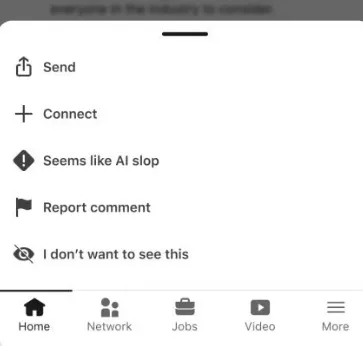
“AI slop” denotes anything AI-generated designed without creativity or original thought. The content is bland, leaving a person asking what they just read. The only purpose of “AI slop” is to fill the newsfeed with many posts without any meaning.
LinkedIn initiated the “Seems like AI slop” button in July 2026. Thanks to this button, users have a chance to report any comment, or post they believe is a poor example of AI-generated content. The number of such flags directly affects LinkedIn’s models for detecting AI content. LinkedIn’s chief product officer has stated that the company sees AI slop as “a very important issue” in a post published by Fortune.
The issue is massive. A research conducted by Pangram – a tool for detecting AI content mentioned in this very Fortune article showed that 40% of long posts and 30% of short posts are completely AI-generated. Although the company calls some of the research findings into question, LinkedIn considers it an urgent issue that requires changing the algorithm and stopping the use of the previous tool for improving Posts.
How does LinkedIn actually detect AI slop?
When it comes to flagged texts, LinkedIn does not delete them; it rather reduces their visibility to only people from one’s close circle. Forbes notes that the marking feature is closely integrated with LinkedIn’s internal detection systems, which automatizes the process of reviewing typed texts by rejecting numerous spams on a daily basis.
Unfortunately, detection measures bear certain imperfections as they rely on patterns, such as reuse of the same stylistic models, overly generic grabbers, and a complete absence of personal touch and unique expressions. However, since patterns can be corrected, this is good news for writers.
AI slop vs human-sounding content: what is the real difference?
The gap is not “used AI” versus “did not use AI.” It is effort versus no effort.
| AI slop | Human-sounding content |
|---|---|
| Generic hook like “In today’s world…” | Specific hook tied to a real event, result, or observation |
| No personal experience or original data | Includes a real number, experience, client example, or mistake |
| Same predictable structure every time | Structure changes based on the idea being discussed |
| Vague advice anyone could give | A clear, specific, sometimes debatable opinion |
| Polished but empty | Slightly rougher, but honest and specific |
| Repeats common knowledge | Adds an insight, example, or perspective that isn’t obvious |
| Sounds like it was written for everyone | Sounds like one person is talking to one audience |
| Uses filler to sound authoritative | Gets to the point and says something concrete |
| Makes broad claims without evidence | Supports claims with examples, data, or firsthand experience |
| Optimized to sound “professional” | Written to sound natural, direct, and human |
What are the best ways to make AI content sound human on LinkedIn?
To ensure the authenticity of your AI-assisted writing, perform the following tests:
- Inserting a true detail in your content will reveal the lack of depth in an AI product. 3 is the road number, John Roberts is the name of one fictional person with his/her permission, and December 7 is your mistake. In this case, AI would be unable to modify any of the errors.
- Rewrite the information avoiding the lists of 3, if possible. AI prefers using this “concise, clear, and efficient” model in its texts.
- Keep the sentences short and clear. Use the Subject – Verb – Object sequence.
- Insert your own opinion into the writing process since AI prefers neutrality.
- Remove AI phrases from your work. Become a straight follower of your own writing style.
- Test your writing by reading it aloud. If it doesn’t sound like a press release, it is good to go.
We cover this exact editing process in more depth in our guide on how to make AI content sound human, including line-by-line fixes you can apply to any AI draft.
How can beginners use AI for LinkedIn without triggering slop filters?
When you are using AI to write your articles, keep the following checklist handy.
- First, create the first draft of everything using AI so that it helps you with the grammar and structure.
- Then, write the draft in the first person.
- Carefully fact-check the content of any statement made, as sometimes there could be errors or inaccuracies.
- Next, tell others if they should know about the AI being involved in the preparation of the article.
- Finally, get to know the principles of watermarking AI-generated text, as it has become quite common nowadays and useful for text verification.
Therefore, this is the algorithm of how to use AI when writing on LinkedIn.
How does E-E-A-T fit into avoiding AI slop?
At this moment, Google and LinkedIn provide the same advantages, which can be settled content grounded in tangible experience, expertise, authority, and trust. The process is carried out in the following way.
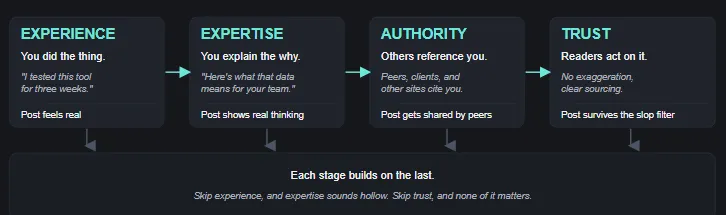
All the stages rely upon each other. Skip experience and love expertise. Skip trust and expertise will count for nothing.
Key takeways
AI mess on LinkedIn does not mean the prohibition of AI per se. What it literally forbids is the lazy use of AI technology. Add real life experience, your opinion, and avoid clichés while being transparent regarding the use of AI technology when its application is meaningful.
Always verify any AI-assisted post for E-E-A-T before publishing it. Keeping this simple habit tells your contents apart from the mess of AI on LinkedIn.
