
Costume ideas can quickly come to nothing. Once a trendy costume idea emerges, it sells out, but members of the group chat still need an eerie profile picture to send out.
Bing’s AI tools can be used to solve such a problem. Three of them have the ability to convert one photo into Halloween sticker or costume look or fantasy character. For edits beyond these tools, see our guide on how to use Bing Image Creator.
Why does Halloween suit AI photo tools?
Halloween is celebrated on October 31 and has its origins in the Celtic festival of Samhain. Nowadays, it is a worldwide celebration of costumes, pumpkins, and scary tales. The participants in this event dress up and post photos, and this is how AI photo tools work perfectly for Halloween. It is possible to become a vampire, a dragon, or even a werewolf in just a few seconds and without spending money on a costume.
What are the best Bing AI tools for Halloween?
There are three AI photo tools that Bing provides and that are aimed at celebrating Halloween. These tools are named the Sticker Generator, Try on Costumes, and Imagine Me As and provide similar functionality.
Additionally, the user must choose a style, upload a photo and get his/her results.
How does the Bing AI Sticker Generator work?
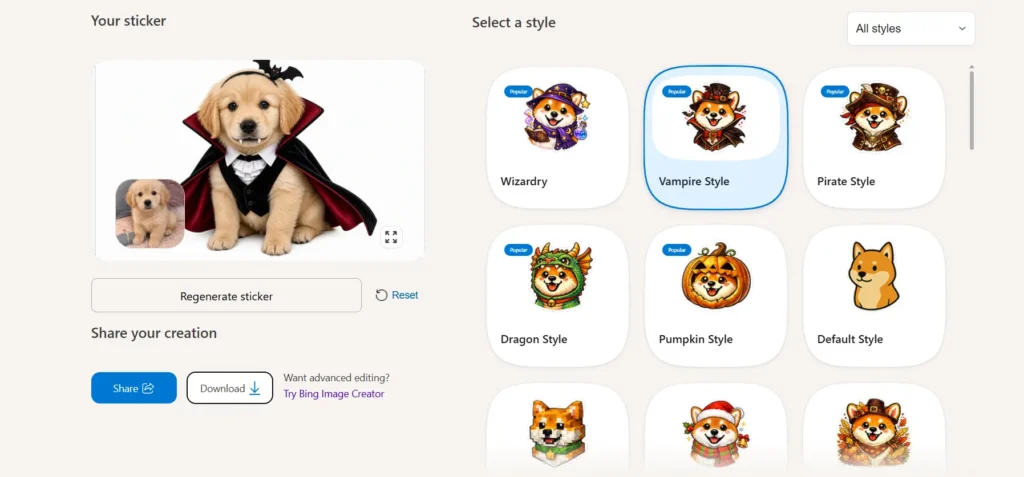
The Bing AI Sticker Generator has the capability of turning your images into bespoke, stylish stickers. This tool can be used for conversations, presents and creative work.
For its operation, follow these three steps:
- Pick a style.
- Upload an image.
- Create a sticker.
Five styles feature the “Popular” label: Wizardry, Vampire Style, Pirate Style, Dragon Style and Pumpkin Style. In addition, there are Default Style, Christmas Style and Minecraft Style among those available. Thus, there is a particular autumn style as well.
The preview of the sticker shows a golden retriever puppy turned into a sticker featuring a vampire with a cape. After you have your sticker made, you can generate it again, reset or share it or download it. Furthermore, if you want to modify your sticker, you can do so with the help of Bing Image Creator.
Best Halloween picks: Vampire Style, Pumpkin Style and Wizardry.
Can Bing AI put you in a Halloween costume?
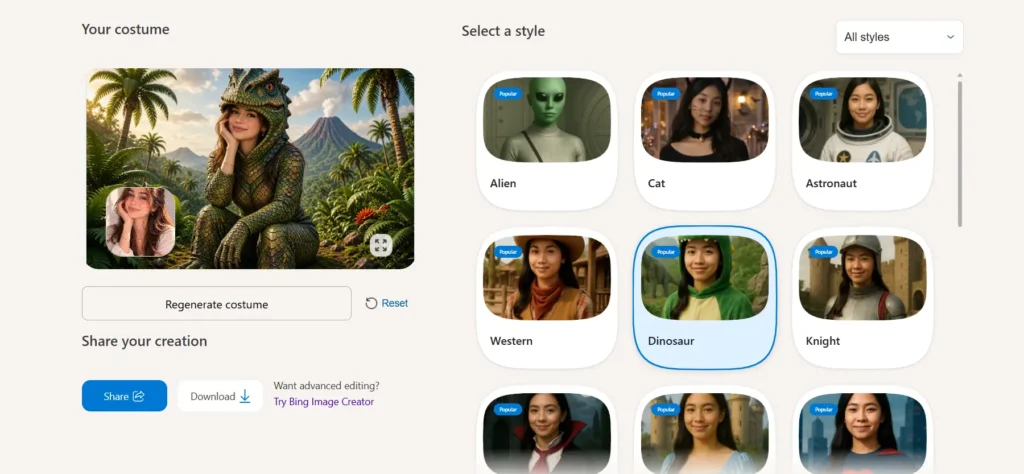
Yes. Bing’s try out costume enables you to resemble classic or fantastic images. This is a great help for parties, cosplay, or whatever creative plans you have.
Everything is quite familiar: choose your costume design, upload your picture and create costumes. You will see a dinosaur costume among the jungle view with a volcano in the background. You can recreate, delete, share, or save the design.
The “All styles” menu is quite longer:
- Alien, astronaut, cat, and a dinosaur
- Halloween, vampire, superhero, and a hero
- Fantasy, knight, medieval, and a princess
- Western, cowboy, and cowgirl
- Holiday themes such as Christmas, Easter, Thanksgiving, and Valentine’s Day.
Best Halloween picks: Halloween, Vampire, Alien, Cat and Dinosaur.
How do you use Imagine Me As for a fantasy Halloween look?
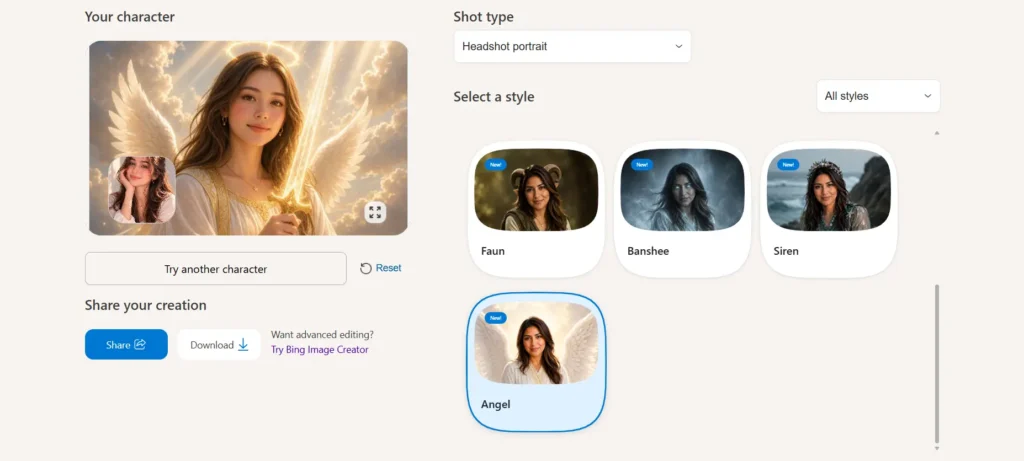
Imagine Me As encourages individuals to take on the role of their favorite fictional character. This experience consists of the following steps. First of all, select the character – think about the type such as headshot portrait and upload a photo of yourself to create and visualize the character of your own choosing.
The list of characters is as follows:
- Angel, Banshee, Celestial and Creature
- Elf, Fantasy, Faun and Ghost
- Gothic, Mermaid, Minotaur and Monster
- Mythology, Ogre, Orc and Siren
- Undead, Vampire, Warrior and Werewolf
Take into account that Banshee, Faun, Siren and Angel have a new feature.
Nevertheless, if you happen to be dissatisfied with the character that was created, use the button “Try another character”
Best Halloween characters include: Banshee, Ghost, Gothic, Undead and Werewolf.
Which Bing AI tool should you pick?
| Tool | Best for | Output |
|---|---|---|
| Sticker Generator | Chats, gifts, quick shares | Stylised sticker |
| Try on Costumes | Party and cosplay ideas | Costume portrait |
| Imagine Me As | Fantasy and spooky characters | Character portrait |
Want something cute to send friends? Start with the stickers. Want to preview a party outfit? Try costumes. Want something eerie? Pick Imagine Me As.
How can you get better results from Bing AI Halloween tools?
Certain habits will be useful for all three tools in this article.
- First, pick the style. All tools begin with the style choice, so once you know which mood to go for, you are ready to start.
- Next, use the regenerate option. The Sticker Generator and Try on Costumes have a regenerate button. Imagine Me As, meanwhile, offers “Try another character.”
- Then, choose one theme and use it across all three tools. For example, create a vampire sticker, a vampire costume and a vampire character, and then keep the one you like best.
- Finally, use Bing Image Creator for changes. Every tool links to it, so you can edit your result there if you want to adjust it further.
Which other AI tools can you use for Halloween?
Bing is not your only option. You also ought to check out these two.
👻 EaseMate AI Halloween Filter: Transform your everyday selfies into creepy pictures with effects like ghosts, zombies, vampires, and witches, or create a look that you want by describing it.
🎬 Hailuo AI Halloween Generator: This is much more than just an image generator. Hailuo transforms your pictures or any text into eerily charming Halloween videos.
Conclusion
Halloween preparation is simple due to Bing AI tools, as they provide assistance even if the preparation is just a few hours before the event. Sticker Maker produces a fast and accessible sticker. See Yourself in Costumes presents you with ideas for the party outfit. Imagine Me As makes it possible to give your photo an exciting feature. Select a style, insert a photo, and then enjoy and distribute your new creativity with your family and friends.
Furthermore to do you want to take it one step ahead? Try these image prompts for Bing in Bing Image Creator.
